Wix is one of the most popular website builders on the market. It’s a flexible, general-purpose platform that can power everything from small business sites to portfolios and online stores.
For podcasters and modern creators, Wix can definitely help build a site, but the real question is that whether it’s optimized for their processes and workflow.
A podcast website needs more than a basic homepage. When you update episodes via your podcast hosting platform, you want it to automatically sync with the website and show the latest episodes. You need to import the media players, all past and future episodes (show notes, transcripts), subscribe icons, podcast reviews and much more.
Wix can be used as a Wix podcast website builder, but it typically requires a lot of manual work and more compromises than a podcast-first platform. This guide breaks down what to expect, how to set up a Wix podcast player experience, and when a dedicated tool like Beamly is a better fit.

Quick verdict: is Wix good for podcasters?
Wix is a reasonable choice if:
- A drag-and-drop editor matters more than podcast-specific workflows
- The catalog is small, or publishing is occasional
- Manual maintenance is acceptable (creating pages, adding embeds, keeping things updated)
When Wix is usually not the best choice:
- Monetization is part of the plan (memberships, gated content, private feeds)
- Episodes should be imported and kept in sync automatically
- Chapters/timestamps, transcripts, and deep linking are important
- SEO and scale matter (dozens or hundreds of episodes)

Wix basics: what it is (and what it isn’t)
Wix is a website builder and host – but it’s not really a podcast website builder. Generally speaking, Wix is great for many use-cases but not really optimized for podcasting. It helps design generic pages, manage navigation, and publish a site, so you can do a bunch of different things with it.
Usually, Wix is not where you would host and distribute the audio. That’s usually handled by a podcast host that stores your audio files and generates an RSS feed for Apple Podcasts, Spotify, and other platforms.
Wix offers both free and paid plans. The free plan typically includes Wix branding and a Wix subdomain. Using a custom domain and removing branding usually requires a paid plan (pricing changes often, so it’s best to check Wix’s current plans before committing).
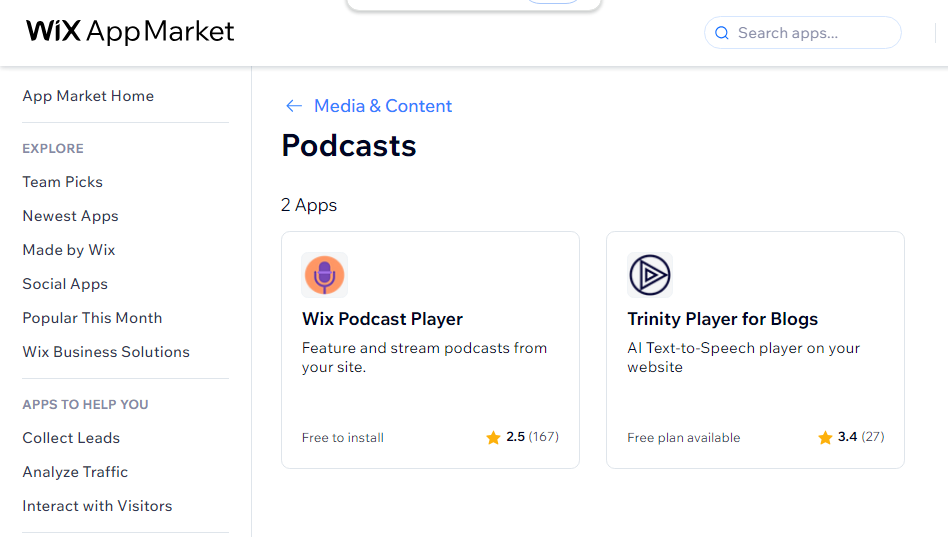
Can you build a podcast website on Wix?
Yes, it’s definitely possible. A Wix podcast website usually comes together through one of these approaches:
- App/widget approach: add a podcast player app (from the Wix App Market or a third-party provider) and connect the show (often via RSS if supported).
- Embed approach: embed HTML or Javascript players from the podcast host or listening platforms, and build episode pages and show notes manually.
Both approaches can work. The difference is how automated and podcast-specific the workflow becomes.
How to create a podcast website on Wix (step-by-step)
Step 1: Use the manual editor (not the auto-generated setup)
Wix can generate a site automatically based on a few questions. That can be fine for generic websites, but podcast websites usually need a deliberate structure: an episodes hub, a repeatable episode page layout, and consistent show notes formatting.
Starting with a template and customizing it is usually the safer option for podcasters.
Step 2: Create the core podcast website pages on Wix
Create all the root/core pages you want on your site, for example:
- Homepage: podcast description, latest episode, and a clear subscribe call-to-action
- Episodes page: a page visitors can browse when they’re ready to listen
- About: hosts, the promise of the show, credibility, and links
- Contact: guest pitch form, business inquiries, or listener feedback
If the show has a clear niche, adding a blog section can also support long-term SEO (updates, resources, episode roundups).
Step 3: Add a Wix podcast player (or embed your own)
This is where many Wix podcast sites either stay simple or become a long-term maintenance project.
If a podcast app/widget with RSS support is available, use it. It can save time by pulling episode metadata and giving the episodes hub a more structured feel.
If RSS importing is limited, embedding a player is the fallback:
- Embed the podcast host’s player on episode pages
- Or embed players from directories (like Spotify) where relevant
Embeds can get a site launched quickly, but they often create a manual workflow for show notes, internal linking, and SEO over time.
Step 4: Build episode pages that are worth ranking
Even if the player is embedded, each episode should ideally have its own URL that includes:
- The player (app/widget or embed)
- A short summary of what the episode covers
- The full show notes + full transcript
- Links and resources mentioned
- A subscribe block
- Internal links to related episodes
Consistency matters. A repeatable format makes the site easier to maintain and helps search engines understand the content.
Step 5: Add subscribe links
If the only calls to action are “Listen on Apple Podcasts” or “Find us on Spotify”, the podcast is promoted on someone else’s platform instead of building a direct relationship with the audience.
Subscribe links should be visible:
- On the homepage
- On every episode page
- In the header/footer if the design allows
If Wix doesn’t support the exact destinations out of the box, build the block manually with buttons.
Podcasting on Wix: the pros
With Wix, you get a popular platform with lots of other features:
- Visual editor: build layouts quickly without code
- Templates: many starting points that can be adapted to a show
- Standard pages and blogging: it’s easy to create home, about, contact, and post-style pages
- All-in-one site hosting: one place to manage design and publishing
Wix for podcasters: the cons (and why they matter)
The main downside is not that Wix is a bad product. It’s that generic website builders are rarely optimized for podcast workflows and podcast UX.
RSS importing and episode scalability
The ideal workflow is to publish a new episode (or an update) in the podcast host, then the website automatically updates (episode pages, metadata, show notes).
With Wix, this can be harder to achieve cleanly, depending on the app/widget path. When updates become manual, publishing becomes slower and older episodes get less optimization.
Player flexibility, timestamps, and chapters
The listening experience is the main reason visitors come to a podcast website. Depending on the setup, the Wix podcast player experience can be limited compared to podcast-first platforms:
- Fewer customization options
- Less podcast-specific UX (timestamps/chapters, deep links)
- Harder to create a “jump to topic” experience for long episodes
Episode layouts and content browsing
Podcasters often need more control over how episodes are displayed:
- List vs grid alone is not enough for many shows
- Episode cards often need key details (guest, tags, key links)
- Filters for season, category, or topic help people find the right episode
Wix can present content, but the episode browsing experience often takes more manual work and may not scale cleanly.
Podcast SEO structure
Wix has general SEO tooling, but podcast SEO is usually won by consistent episode pages, strong show notes, internal linking, and (often) transcripts. Many podcasters prefer platforms that default to podcast-ready structure instead of requiring manual setup for everything.
What a good podcast website should include
No matter what platform is used, these elements are the foundation.
1) A custom domain
Your podcast brand should live on your own domain. A branded URL is easier to remember, easier to share, and more durable than relying on third-party platforms.
2) A great audio player
Make it easy to play, pause, skip, and keep listening across the site. If episodes are long, chapters/timestamps are a major usability win.
3) An episode hub
Visitors should be able to browse episodes quickly, not hunt for them.
4) Strong show notes
Show notes help listeners and also help search engines understand each episode. Include:
- Key takeaways
- Links mentioned
- Guest links
- Resources and tools
- Full transcripts for all episodes
5) Subscribe links and social proof
Add subscribe links to the major listening apps and consider adding reviews or testimonials if the platform supports it.
6) Podcast reviews
Import reviews of your podcast to show credibility and social proof.
Why Beamly is a better alternative to Wix for podcasters
If you’re looking for a Wix alternative, look no further than Beamly. It’s an all-in-one, no-code platform for podcasters and creators that is highly focused around podcasting as well. It lets podcasters build a full website on their own brand and domain, and it’s designed around podcast workflows:
- Import and sync episodes automatically via RSS from any podcast host, or host it on-platform
- Podcast-first episode pages that scale with large back catalogs
- Customizable player with podcast-friendly UX
- SEO defaults for podcasts (clean structure, sitemaps, and podcast-ready pages)
- Audience and monetization tools like memberships and gated content with 0% platform fees (Stripe fees apply)
Beamly comes with a lot of built-in automations, so seeing up a full podcast website with it can really take minutes to set up, and save you hours on the ongoing maintenance/updating workflows.
For a direct comparison, see Beamly as a Wix alternative.
FAQ
Can you podcast on Wix?
Yes. Wix can host a podcast website and play episodes using apps/widgets or embedded players. The main limitation is that podcast-specific features and automation may be limited compared to a podcast-first site builder.
How to create a Wix podcast page?
You can create a separate page for your podcast on Wix and manually embed your episodes there. Alternatively you can look into Beamly (formerly known as Podcastpage) and create your complete podcast site with it.
How to add a podcast to Wix?
Two common ways:
- Add a podcast player app/widget and connect the podcast (often via RSS if supported).
- Embed a player from the podcast host or a directory and create episode pages/show notes manually.
Does Wix support RSS podcast importing?
Some Wix setups can display podcast episodes via widgets/apps, but RSS-based automation can be limited compared to dedicated podcast website builders. Generally speaking you don’t get a valid Wix podcast RSS feed.
What is the best Wix podcast player option?
The best option depends on what’s available in the Wix App Market and what the podcast host supports. If chapters, transcripts, and scalable episode pages matter, a podcast-specific platform tends to provide a better experience.
What’s a good Wix podcast template?
You can search the template directory or if you’re open to switching platforms, look at Beamly’s podcast site templates.
Can you host a podcast on Wix?
Wix isn’t really a podcast hosting platform. You can look into other options like Beamly for hosting your show.
Conclusion
Wix can be a solid choice for a basic podcast website – especially if a visual website builder is the priority and manual maintenance is acceptable.
A quick rule of thumb:
- Use Wix if the site is mostly a homepage plus a few embedded episodes, and managing episode pages and show notes manually is fine.
- Use a podcast-first website builder if the plan is to publish consistently, scale to a large back catalog, and use the website as a long-term growth channel.
If the second option is the goal, Beamly is built for podcasters. It helps import and sync episodes via RSS, publish podcast-first episode pages on your own domain, use a customizable player, and monetize with memberships and gated content with 0% platform fees (Stripe fees apply). For a direct comparison, see Beamly vs Wix.