If you have ever submitted a show to Apple Podcasts, Spotify, or any other podcast directory, you’ve probably already used your podcast RSS feed.
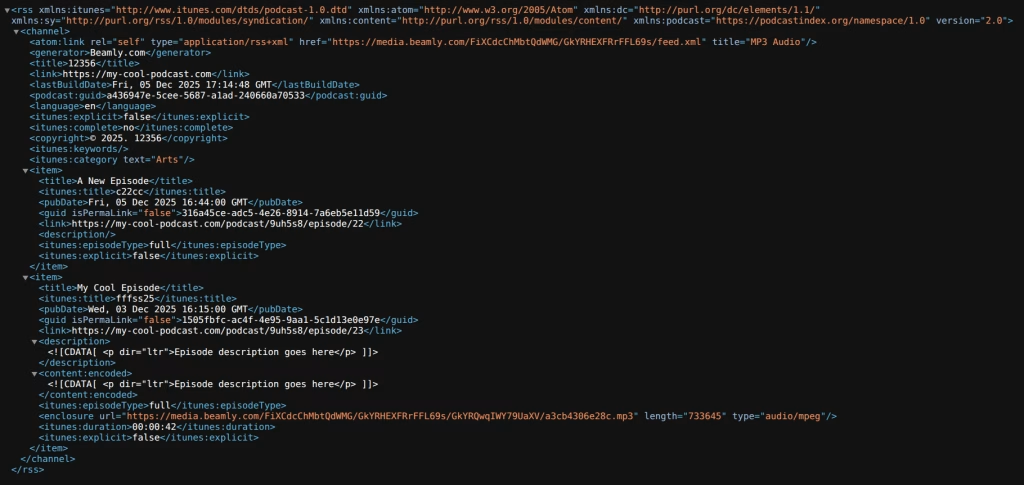
A podcast RSS feed is a public URL that points to a simple text (rss/xml) file describing your podcast (title, artwork, categories, and more) and listing your episodes. Podcast apps and directories read that file to keep your show updated everywhere your listeners follow you.
The good news is that most creators do not need to write code or build a feed manually. But understanding how RSS works helps you avoid common distribution mistakes, choose a hosting setup that will not trap you, and build a podcast website that you actually own.
You might also see people call this your podcast feed, or use terms like podcast feed URL. It’s all about the exact the same thing: the RSS feed URL your show is distributed through. RSS is a building-block of the podcasting world, and its an open format by design.
What is a podcast RSS feed?
RSS stands for Really Simple Syndication (you might also see the older name RDF Site Summary). At a practical level, RSS is a standardized way to publish updates as a feed that other software can read.
For podcasting, that means:
- Your podcast host (or platform) maintains an RSS feed file, typically in XML.
- That feed includes metadata about your show plus a list of episodes.
- Podcast directories and apps fetch the feed regularly to display your latest episodes and show details.
One of the most important characteristics of podcast RSS feeds is that they are an open format. When podcasting stays open, creators can publish in one place and still reach listeners in many apps. That is a big reason podcasting has grown so quickly. In recent years, that “open” definition has faded a bit. Some platforms like Spotify or others are not publishing RSS feeds by default – this helps them “own” the content in-platform. (although you can still always enable this feature)
How do podcast RSS feeds work?
The simplest way to explain would be:
- You publish an episode (upload audio, add a title and show notes).
- Your podcast hosting provider updates your RSS feed with a new episode entry.
- Directories (like Apple Podcasts) and other platforms fetch your feed and update your listing.
- Podcast apps update what listeners see and can automatically download the newest episode.
When a listener subscribes to your show, they are effectively subscribing to your RSS feed. Their app checks for updates and pulls in new episodes.
What’s inside a podcast RSS feed?
Podcast RSS feeds usually have two levels:
- Show-level data (information about the podcast/channel itself)
- Episode-level data (one “item” or entry per episode)
Show-level data (the overall podcast)
At the top of the feed, you will normally find details like:
- Podcast title and description (what the show is about)
- Website link (where people can learn more)
- Artwork (podcast cover art)
- Categories (how platforms classify your show)
- Explicit setting (if relevant)
- Language, author, and other metadata
Episode-level data (one entry per episode)
Each episode is usually represented as an item entry that includes:
- Episode title
- Publish date
- Audio file URL (often inside an
enclosureelement) - Show notes (the episode description)
- A unique ID (often a GUID) to help apps avoid duplicates
Here is a tiny, simplified example of what an episode entry can look like. Do not worry about writing this yourself – it is just useful to recognize what is happening under the hood:
<item>
  <title>Episode 12: Building a podcast website that ranks</title>
  <pubDate>Wed, 31 Dec 2025 10:00:00 GMT</pubDate>
  <guid>example-show-ep-12</guid>
  <enclosure url="https://example.com/audio/episode-12.mp3" type="audio/mpeg" />
  <description>In this episode, ...</description>
</item>
How to create (or get) an RSS feed for your podcast
For most creators, the correct answer is simple: choose a podcast hosting provider that generates the feed for you.
When you set up a show with a host, you typically:
- Enter your show name, description, and artwork
- Publish episodes by uploading audio and writing show notes
- Receive an RSS feed URL you can submit to directories
That is it. No coding required.
Two common scenarios
- Starting from scratch: pick a host, create your show, publish a few episodes, then submit the RSS feed to directories.
- You already have a podcast: your RSS feed already exists. Your host will show it in your dashboard. If you cannot find it, a good first step is to check your podcast host settings or your distribution settings.
What to look for in a podcast host when it comes to RSS feeds
RSS sounds simple, but your feed quality matters. When comparing hosts, check for:
- Feed stability: does the feed URL remain stable long-term?
- Reliable hosting: fast servers and high uptime so directories can fetch your feed consistently.
- Migration support: can you move later without breaking subscribers? (Good hosts support redirects and clean migrations.)
- Modern metadata support: do they support Podcasting 2.0 tags like transcripts?
How Beamly fits in
Beamly supports two practical paths:
- Host your podcast directly on Beamly: upload episodes and Beamly generates and maintains your RSS feed (plus your website) in one place.
- Import your existing RSS feed into Beamly: if you already host your podcast elsewhere, you can connect your RSS feed and Beamly can automatically build a podcast website that stays in sync as you publish new episodes. (without moving your podcast)
That website angle matters because RSS is your distribution layer, but your website is often your growth layer. With a creator-owned website, you can publish episode pages, add transcripts, capture emails, and build memberships.
Beamly includes built-in memberships and private feeds with unique per-member RSS for premium content.
Public vs private podcast RSS feeds
Most podcasts use a public RSS feed. Anyone can access the URL, podcast directories can read it, and listeners can subscribe in any app.
A private RSS feed (often called a private podcast feed) is different. Instead of being a public distribution URL, a private feed is meant for restricted content, for example:
- Paid bonus episodes and ad-free feeds
- Internal company podcasts (training, onboarding, business updates)
- Student or cohort-based content
- Premium seasons released early
Private feeds typically work by issuing a unique feed link to each listener or member. That link can be added to many podcast apps by pasting the URL, and the app will fetch episodes from it just like a public feed.
One important nuance: private feeds are not magic DRM. If someone shares their private feed link publicly, other people could subscribe too. This is why the best private podcast setups use unique per-member URLs (so access can be rotated or revoked when needed) and a website login as the main access layer.
To learn more, see: How to Create a Private RSS Feed for Your Podcast and How to Create a Website for a Private Podcast.
What to do with your podcast RSS feed
Once you have your RSS feed URL, the typical next steps are:
- Submit your RSS feed to the major directories (Apple Podcasts, Spotify, and others).
- Keep publishing episodes from your host.
- Let the directories update automatically as they fetch your feed.
Beamly has a full distribution walkthrough here: Podcast Distribution: Where to Publish Your Podcast.
Keep your feed URL stable
Your RSS feed URL is not just a link. It is what apps use to keep subscribers connected.
If you ever change hosts, the right approach is usually to set up a redirect from your old feed to your new feed so directories and apps can follow the move. This is a common place where creators accidentally lose subscribers.
See: How to migrate your podcast RSS feed or change podcast hosts?
Do you need an RSS feed if you already have a website?
In most cases, yes.
Your website is where people can read show notes, browse categories, and discover your back catalog. But most podcast apps still rely on RSS feeds as the source of truth for episode updates.
The best setup is usually:
- A reliable RSS feed for distribution
- A creator-owned website for branding, SEO, and audience ownership
If your website is built on Beamly, you can import your RSS feed and automatically generate episode pages that stay updated as your feed changes. That gives you the convenience of RSS-based automation while keeping your brand and content hub under your control.
Podcasting 2.0 and the Podcast Namespace
RSS works great for 20+ years now, but it was not designed for everything modern podcasts need (like standardized transcripts, rich contributor data, chapters and more).
That is why the Podcasting 2.0 movement introduced the Podcast Namespace: an open set of additional RSS tags that help podcast apps and platforms support richer experiences, while keeping podcasting portable.
Here are some of the most useful Podcasting 2.0 tags to know about:
podcast:transcript– links to an episode transcript (often better than embedding huge transcripts inside the feed).podcast:chapters– links to a chapters file so apps can display segment navigation.podcast:funding– lets you include funding or donation links.podcast:soundbite– highlights timestamped audio clips.podcast:person– identifies hosts, guests, editors, and other contributors.podcast:locked– helps prevent unauthorized platform transfers.podcast:seasonandpodcast:episode– improves season and episode numbering.
More and more hosting platforms are adopting this new standard and including newer tags in RSS feeds.
You can read a little more on Podcasting 2.0 here: Exploring the new standard for podcast RSS feeds (Podcasting 2.0)
FAQ
What is a podcast RSS feed?
A podcast RSS feed refers to the publicly available feed file where all the podcast info (including all episodes) is listed. This RSS feed is the file podcast apps and directories read to display your show and keep episodes updated.
How to find a podcast’s RSS feed
Check Beamly’s free Podcast RSS feed finder tool to easily search and copy link to the feed. If the podcast in question is still new and you can’t find it, you can:
- Check the podcast’s website: some sites link to the RSS feed directly.
- Check the host dashboard (if it is your show): most hosts display the RSS feed URL in settings.
- Use a podcast directory listing: many directories pull from Apple Podcasts or the original host and may reveal the feed source.
In some cases, a show may not expose a public RSS feed (for example, if it is exclusive to a single platform).
How to get an RSS feed URL for a podcast
For your own podcast, the RSS feed URL is usually shown inside your podcast hosting provider’s dashboard. If you cannot find it, look for areas labeled “RSS”, “Distribution”, “Directories”, or “Publishing”.
How to create an RSS feed for a podcast
Most creators do not need to code. A podcast host generates the RSS feed automatically when you publish episodes. Manual feed creation is possible, but it adds maintenance work and can create avoidable mistakes.
How to add an RSS feed to Apple Podcasts?
You submit your RSS feed in Apple Podcasts Connect, then Apple validates it and reviews the listing.
If you’re searching for an “Apple Podcasts RSS feed”, it usually means the RSS feed URL from your hosting provider that Apple Podcasts reads to keep your show updated.
For the full walkthrough, see:
How to validate a podcast RSS feed (podcast feed validator basics)
If a directory rejects your submission, it often means your feed is missing required fields or one of your episode audio URLs is not accessible. You can check Beamly’s free Podcast Feed Validator tool for that.
How to get an RSS feed for a Spotify podcast
On Spotify, not all podcasts even have a public RSS feed URLs. Those must be explicitly enabled. You can do that yourself on the Spotify for Creators dashboard.
Can you use Google Drive or Dropbox for a podcast RSS feed?
You can self-host your podcast, and there are various tools (free or paid) that’d let you do that. However, this may involve quiet a lot of set up if you want to do it right. We won’t recommend using apps like Google Drive or Dropbox to really host a podcast. Yes, those are file storage tools, but it’s far from being simple and easy for podcasters. (It does not generate a podcast RSS feed for you.)
Can a podcast be on YouTube and still have an RSS feed?
Yes, a podcast can be on YouTube while maintaining an RSS feed. YouTube does support ingestion from RSS feeds but does not generally generate a feed for you.
Can you get a free RSS feed for a podcast?
Yes, many free podcast hosts will generate an RSS feed. The trade-off is that free plans often come with limitations (branding, analytics, storage, or fewer controls) and sometimes use the host’s domain for your feed.
If long-term ownership matters, consider a setup that keeps your feed stable, supports migrations, and lets you build a real website that you control.
Conclusion
A podcast RSS feed is the foundation of podcast distribution. It is the single source that directories and apps read to keep your show updated, and it is a big reason podcasting remains an open format.
If this is the only thing to take away, make it this: treat your feed like infrastructure. Keep it stable, keep it complete, and pick a setup that lets you grow without locking you into one platform.
Quick next steps
- Find and save your RSS feed URL in your hosting dashboard.
- Submit the feed to the major directories and confirm your listings update correctly. Start here: Podcast Distribution: Where to Publish Your Podcast.
- Decide if private feeds matter for your show (premium episodes, internal podcasts, student content). If they do, use unique per-member feed links and a website membership layer. Learn more: How to Create a Private RSS Feed for Your Podcast.
- Use modern metadata when it helps. If transcripts, chapters, or richer guest data matter, look for Podcasting 2.0 support and feed tags like
podcast:transcriptandpodcast:person.
Once your feed is in place, build a real home for your show. With Beamly, you can host your podcast or import an existing RSS feed to launch a website that stays synced, supports modern metadata like transcripts, and gives you a direct relationship with your audience.