An RSS feed makes it easy to distribute your podcast to multiple directories and platforms. Most feeds are publicly accessible, so they can be consumes from any RSS-reader app, downloaded or accessed directly via your browser. When dealing with private RSS feeds, things are a little different. So, what should you do if you want to make a private podcast?
Whether you want to deliver exclusive episodes to your paid podcast members, or you need to set up a business podcast for internal use, you can create a private RSS feed for your podcast, or better yet – build a private podcast website.
In this post, we’ll take a closer look at why you need an RSS feed (and why you might need a private one). Then, we’ll show you how to create a private RSS feed for your podcast. Let’s get started!
What Is an RSS Feed (And Do You Need One)?
Podcasters have to share their RSS feed (which stands for “Really Simple Syndication”), so that people can find and subscribe to the show.
Essentially, an RSS feed is a text-based computer file that contains all your podcast data. This includes audio files, episode titles, podcast artwork, show notes, etc.
It enables you to distribute episodes across different platforms (like Apple and Spotify), maximizing discoverability. Technically, you can syndicate any type of content via an RSS feed, including blog posts, articles, videos, and of course, podcasts.
The feed will aggregate all your episodes (and update in real-time). Then, you can submit your feed to various podcast directories. This makes your content super easy and convenient for users to locate and engage with.
Although you can create an RSS feed yourself, most podcast hosting companies will do this for you. That’s why many podcasters go their entire careers unaware that RSS feeds are responsible for keeping directories up-to-date.
But why do you need an RSS feed?
Basically, it enables listeners to consume your content anywhere they like (e.g. websites, apps, etc). Without one, you’ll drastically restrict the accessibility of your show (or you’ll multiply the work on your side of things).
For example, if you don’t have an RSS feed, you’d have to submit your show to directories manually which is a time-consuming task.
Instead, you just have to think about one feed, and all the directories can pull content from it, without you lifting a finger.
Why Should You Create a Private RSS Feed?
By default, RSS feeds are public feeds that are available online. That’s ideal for most creators, since it makes it easy for listeners to find content.
That said, sometimes, it makes sense to create a private podcast so that episodes are only accessible to certain listeners. Here are some common use cases:
- You want to distribute internal company content (e.g. training, onboarding, business updates).
- You want to share educational content with your students.
- You want to set up a membership podcast to monetize your content.
- You want to grow your email list by offering exclusive episodes.
- You want to share private recordings (e.g. audiobooks).
Essentially, a private RSS feed restricts the availability of your episodes. Perhaps listeners will need to log into your website, pay a subscription fee, or wait to receive an invitation via a unique feed link.
How to Create a Private RSS Feed for Your Podcast
Now that you know a bit more about why you might like to make a private podcast, let’s take a look at how to create a private RSS feed for your podcast.
1. Use a platform that supports Private RSS Feeds
Many podcast hosting platforms support private RSS feeds. You’d need to use a platform that supports private feeds so you can mix and match different levels of access to each episode/podcast you release.
Ideally, you’d be able to have a separate private RSS feed for every single podcast subscriber. You’ll then send out a unique feed link, usually via email or an app.
Listeners can then find your content by entering the feed link into any podcast app (e.g. Apple Podcasts) and get access to the content available to them on their favorite platform. Naturally, this gives you the ability to track data or revoke and modify access on an individual level, or detect fraudulent members (for example people who share your content publicly without permission).
Creating a private RSS feed makes it easier in many cases in which you have a completely separate podcast for members-only, like a premium ad-free feed, or an internal/private show that is only available to paid members. For mixed feeds (free listeners + paid members), you can either provide two separate feeds or work with a more user-facing medium like a website or an app.
2. Build a Membership Website
Building a membership website makes a lot of sense for podcasters and any type of creators who rely on recurring subscription revenue. It’s a win-win both for you as a creator and for your subscribers.
Here’s why – with your own website, you control all the content (and get to keep more revenue). You can include more types of content, have more flexibility and control over the different tiers and so on.
Your users, on the other hand, would enjoy a better experience browsing through the content and getting additional resources. They’d (ideally) be able to send you email messages or recorded voicemail, comment on episodes, and so on.
When you create a private podcast website, you can create a single private feed or multiple private feeds via different subscription tiers and share all those with your listeners. Then, you can set up podcast memberships which require listeners to log-in to gain access or pay a subscription fee to gain access.
Use Beamly to build your own platform
You can streamline the entire process by using a dedicated creator platform like Beamly which handles all the membership + podcast features for you right out of the box:

This way, you can design your entire website using beautiful pre-made templates. Plus, you’ll find essential podcasting features like a customizable audio player and automatic episode imports.
The best part is that Beamly offers built-in membership options, so you don’t have to rely on third-party integrations. This means you can control exactly which content is private (and exclusively available to members of your organization, VIP listeners, etc), and which content is freely accessible (if any). It’s super easy to restrict content based on each tier/plan, and it’s not just limited to podcasts or episodes – you can also include blog posts, custom pages and video channels (or video posts) as restricted content.
Beamly doesn’t take any fees (outside of the standard Stripe fees) so you always get to keep a larger chunk of your hard-earned revenue.
When an non-member/listener tries to reach the page, they’ll see a user-friendly notice that informs them about the restricted nature of your episodes while urging them to sign up:

You can also provide multiple membership tiers with different features and benefits to appeal to a wider range of listeners:
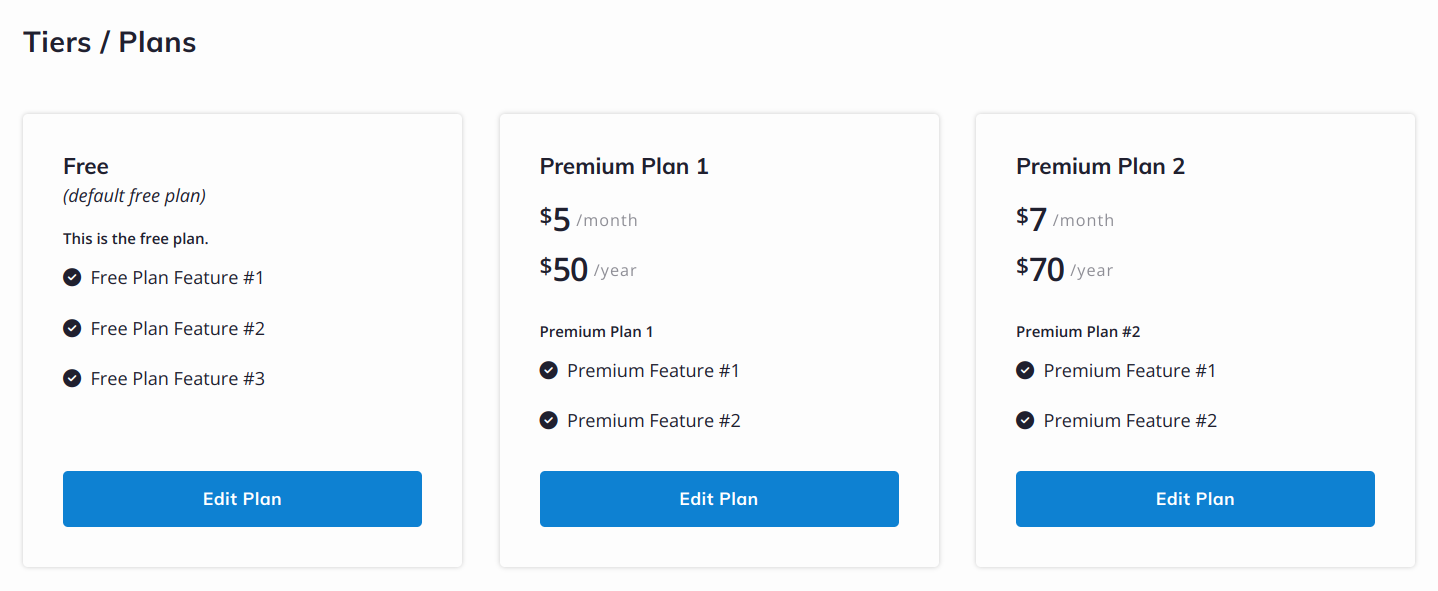
Better yet, Beamly Memberships aren’t just applicable to podcast episodes. You can also restrict access to blog posts and videos. Plus, you can extend the settings to your entire content selection, or gate specific episodes.
Conclusion
Do you need to know how to create a private RSS feed for your podcast? Perhaps you produce internal company content, run an educational podcast, or grant exclusive access to premium members.
Setting up your private podcast feed can make your life easier as a podcaster and also make it more intuitive for your listeners to access their member-only content. With a website builder like Beamly, you can build a full membership podcast website within minutes. You have full control over content access and you can set up as many plans as needed. Get started with a free trial today!