Are you looking for some inspiration in order to build your own podcast website? Creating a website for a client or just launching a new podcast? Podcast websites are our expertise and passion here at Beamly. As we’re building the best website platform for podcasters, we have also curated a list with some of the top podcast website examples available on the web. Here you can learn directly from some of the best podcast website examples that we’ve found online.
The following list includes really good podcast site examples so you can get a better idea of how your podcast website should look. We also include many helpful tips and suggestions for your website – learn what to include on your site, which tools and website builders you should use in order to build it, where to find popular podcast website templates, and more!
The best podcast website examples have many features in common. They all have a beautiful design, great content, and clean & intuitive user interfaces. In addition, some other features are absolute musts, such as a podcast audio player, social & subscribe (or follow) buttons on popular podcast platforms, transcripts, pages with multiple episodes alongside individual episode pages, etc.
Since there are so many website builder options available, you should consider using a dedicated podcast website builder instead of a “generic” website builder since these would include most of the features you need right out of the box, save you a lot of time to get started and to maintain the site.
With 3-4 million podcasts published around the world, there are plenty of great podcast website examples you can use as inspiration. Let’s look at some of the best podcast websites – their designs and structures. Get inspired from the most beautiful podcast websites!
The best podcast website examples
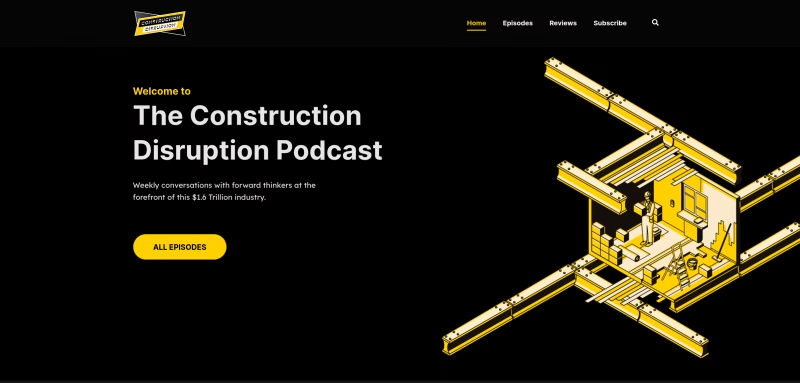
1. Construction Disruption Podcast

- Website – Construction-Disruption.com
- Website builder – Beamly
- Template – Dizzy
- What we like about it –
- Really nice banner on the top of the homepage along with brief info about the podcast and a button.
- Very consistent and bold color scheme – the colors even match the episode artwork images which is great!
- The homepage features the most recent episode in its own section, followed by more episodes, and a section with reviews written about the podcast.
- The subscribe buttons to the podcast appear both in the navigation and footer.
- The overall site design is great, and the soundwaves on the audio player matches that beautifully.
- What we think they can improve –
- There’s a short description about the podcast on the homepage, but perhaps a longer paragraph could help first-time visitors a little more.
2. Full Mutuality Podcast

- Website – FullMutuality.com
- Website builder – Beamly
- Template – Duke
- What we like about it –
- Large graphic/banner on the homepage that shows the name of the podcast. Stays in line with the brand colors all around the website.
- A “sticky” audio player is right there when you load the page – makes it more appealing to play the latest episode and also keeps on playing while moving across different pages.
- Important features like a “Donate” button, “Voicemail” recording widget, showcasing all the podcast’s guests on a separate page, alongside a guest intake form and individual guest pages. These are must-have features for any serious podcasts!
- The podcast info (description, hosts, title and subscribe buttons) is nicely shown on the homepage, followed by a list of episodes filterable by category.
- Each episode gets its own individual URL, the website is fully optimized for SEO and is fully responsive on mobile devices.
- What we think they can improve –
- With such a great website overall it’d be hard to find the points to improve. However, adding a little more content on the different pages (home/episodes/about/reviews) can help both SEO and the visitor experience.
- The website is using 3 “primary” colors, we typically recommend using up to 2 highlight/primary colors and have more neutral colors for the rest.
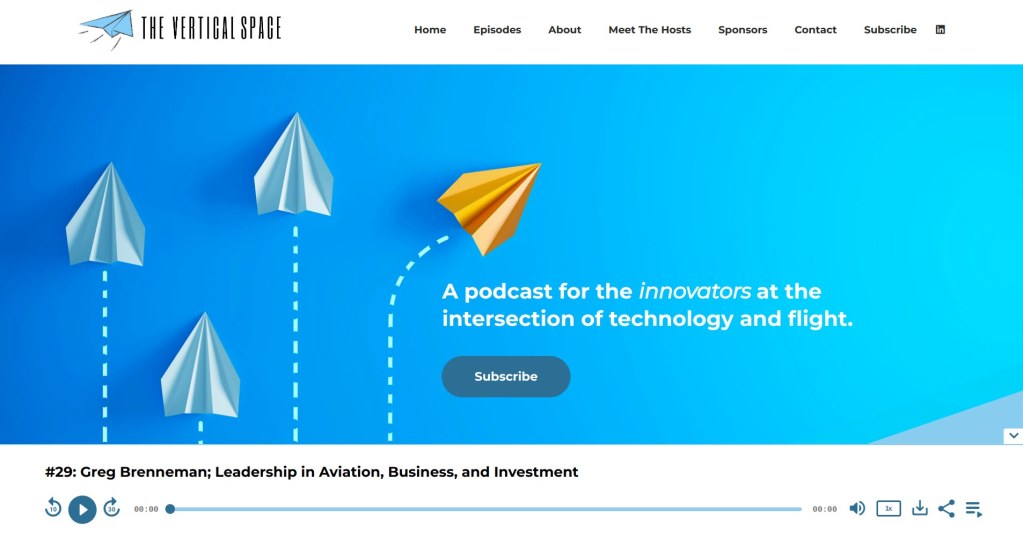
3. The Vertical Space Podcast
- Website – TheVerticalSpace.net
- Website builder – Beamly
- Template – Trane
- What we like about it –
- The design is really clean and intuitive – a great website for a podcast. Top section of the homepage is designed beautifully with a background image, the podcast information and subscribe button.
- A sticky audio player is included on all pages, and continues to play while you scroll through the website.
- The latest episode is featured on the top of the homepage, while other recent episodes are displayed below with category filters.
- What we think they can improve –
- More content sections on the homepage (for example, a word about the hosts or more info about the show) could improve the visitors’ experience even further!
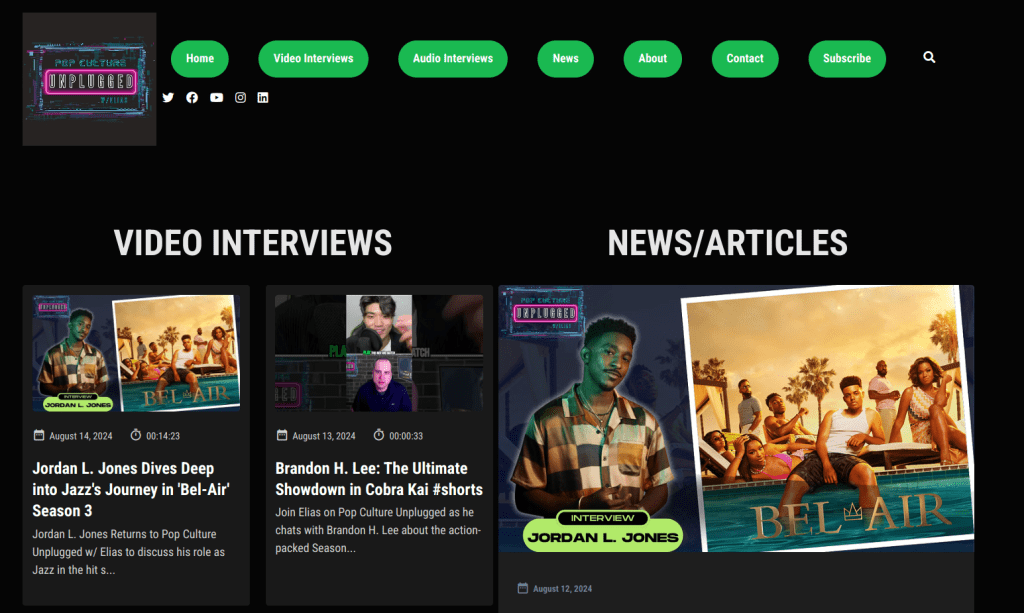
4. The Pop Culture Unplugged Podcast
- Website – PopCultureUnplugged
- Website builder – Beamly
- Template – Dizzy
- What we like about it –
- A dark, beautiful design wrapped by a neat background image on the top of the homepage really makes the website look fabulous.
- The homepage includes a section for the podcast information, subscribe buttons social icons and reviews. Additionally, the recent episodes are listed in a 3-column layout and feature a different image for each episode. (and rightfully so – this podcast brings A-list celebrities as guests so their image on the episode artwork is a must)
- Individual episode pages include a beautiful audio player + a YouTube embed player.
- What we think they can improve –
- We’d love to see an audio player right there on the homepage – that’d attract listeners and possibly get plays from the initial visit.
- A dedicated page with all the different guests could really highlight that part of the show, especially given the high profile guests involved.
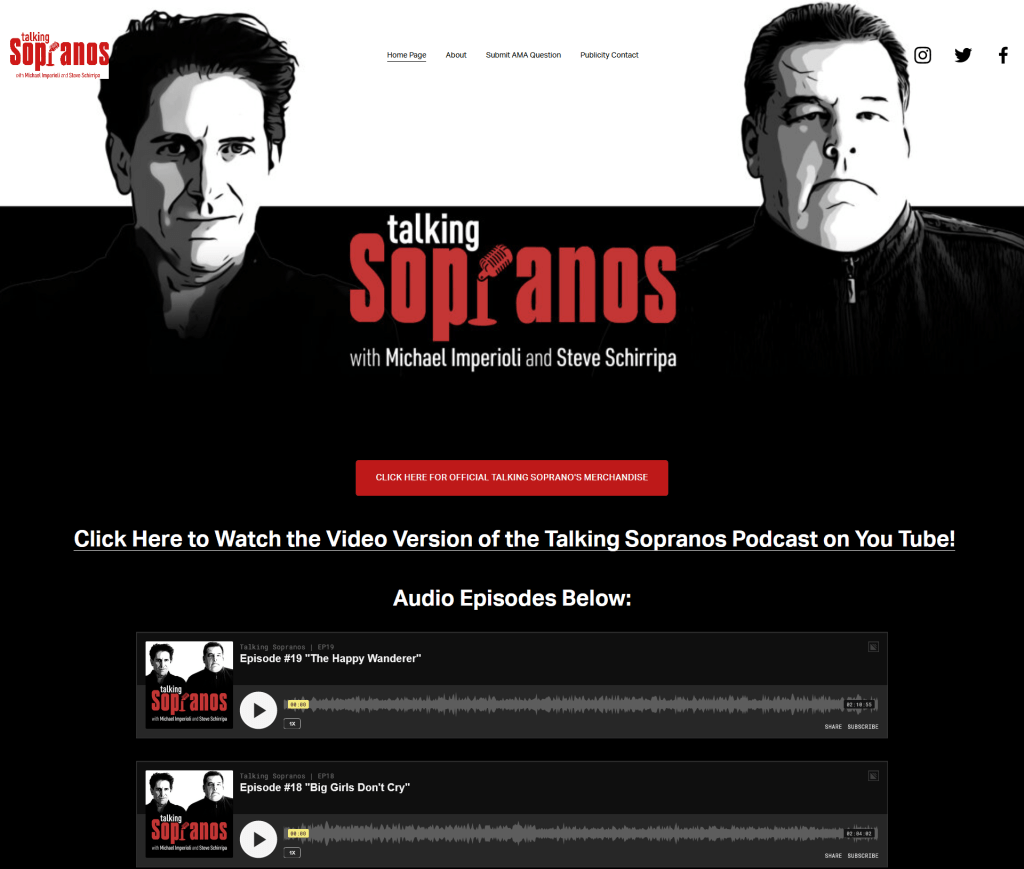
5. Talking Sopranos Podcast
- Website – TalkingSopranos.com
- Website builder – Squarespace
- Template – Custom
- What we like about it –
- Right at the top of the site is an image of both hosts (you may know them as Christopher and Bobby). From simply looking at it above the fold, you get a good sense of what it is about.
- The website color scheme matches the podcast artwork. It uses the same main colors (red, black, and white).
- The episodes are available right away on the main page, and listeners can listen directly to them. The social media buttons and the about page are also easily accessible.
- There is an embedded podcast player from Simplecast, which is more unique than the standard player.
- What we think they can improve –
- Immediately below the episode list on the homepage is a section with merely links and huge buttons, not very informative and awkwardly designed.
- Even though you can figure out what this podcast is about, there’s no description of the podcast.
- Instead of embedding YouTube videos, they link to external videos on YouTube. On a website for podcast – we’d recommend to have all audio/video content on-site.
- There are no podcast subscribe buttons on the site, big no-no!
- There are no separate pages for each episode, which is quite a bad practice for SEO!
6. Queue Points
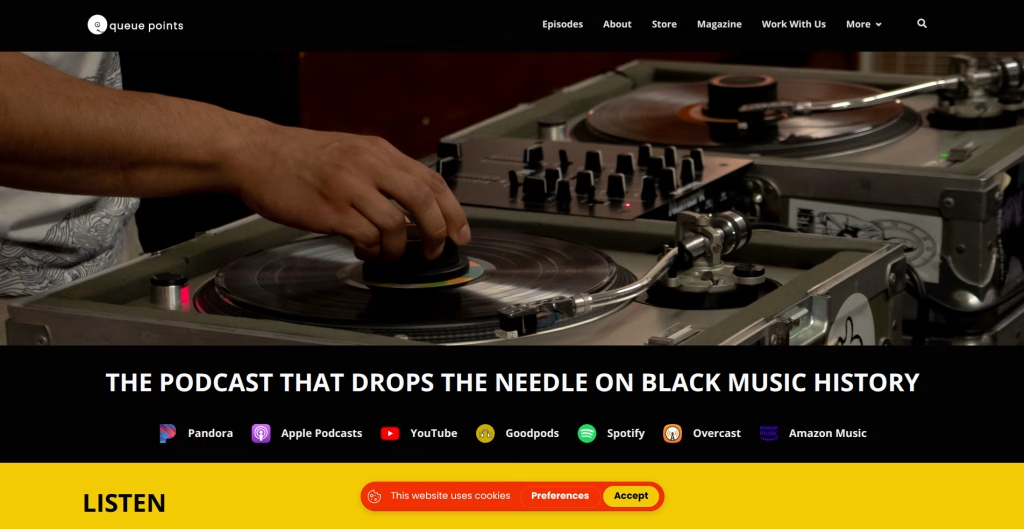
- Website – QueuePoints.com
- Website builder – Beamly
- Template – Blakey
- What we like about it –
- Clean and intuitive design. Works great for their video podcast format.
- Beautiful hero area and custom widgets along the page.
- Not bloated with too many details, you get what you came for.
- Easy to listen straight from the main page.
- Audio, video and extra content like reviews right on the homepage.
- Built-in monetization via podcast membership tiers.
- What we think they can improve–
- Minor, but adding just a little more text context about the show might be helpful, beautiful site otherwise.
7. Curious Minds At Work Podcast

- Website – GayleAllen.net
- Website builder – WordPress
- Template – Satchmo podcast theme
- What we like about it –
- The podcast title alongside the latest episode are always featured at the top of the homepage.
- Nice background images across the website.
- Subscribe buttons are available on the homepage and very visible.
- Guests are featured on the homepage. Additionally, there’s a nice grid of recent episodes there. Also, there’s a nice opt-in form before the footer.
- What we think they can improve –
- There is no audio player on the homepage or episodes page.
- Even though we love the layout of the page – we would recommend to improve the spacing general design around the different pages. Also, font seemed a little smaller for the inner-content part.
8. Sleepwave.fm Podcast
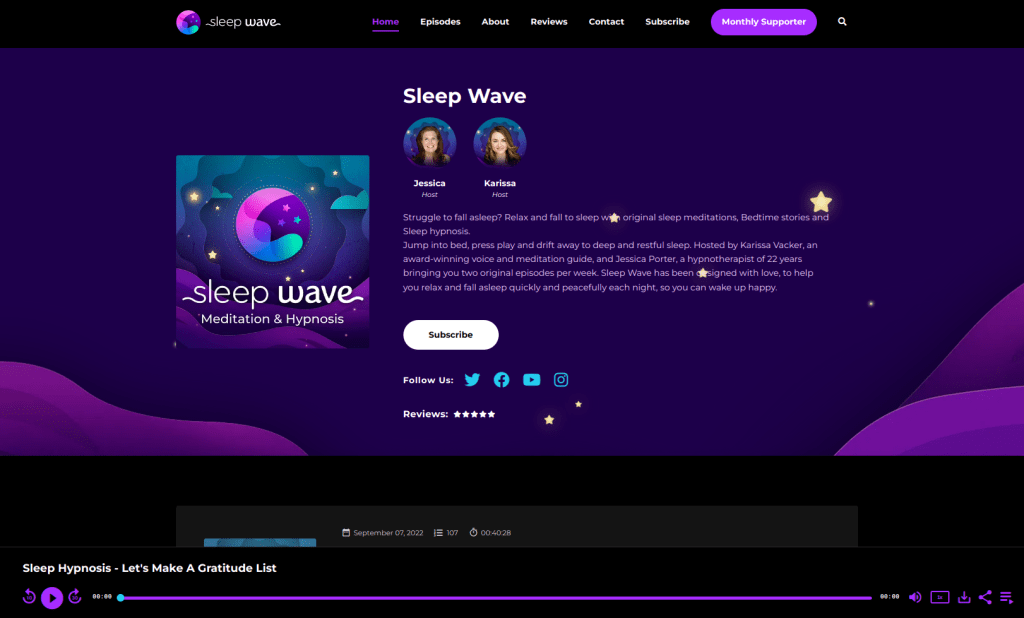
- Website – SleepWave.fm
- Website builder – Beamly
- Template – Basie
- What we like about it –
- A dark, beautiful design with awesome graphics all around. We especially loved the consistency of colors, how they blend with the custom graphics, and the background images.
- There’s a sticky audio player right when you load the page with the most recent episode.
- As always – Individual episode pages with their own URLs are great for SEO.
- Showing the hosts on the top of the homepage next to the podcast information is a great touch.
- What we think they can improve –
- Absolutely beautiful website, so not much to improve. However, the font size could be a little small on inner-pages (like episode page or about page).
9. Afrobility Podcast

- Website – Afrobility.com
- Website builder – Beamly
- Template – Dizzy
- What we like about it –
- Beautifully designed with a dark-mode theme.
- Displays multiple episodes on the homepage.
- Timestamps added in each episode page – easy podcast navigation for listeners!
- Social sharing button within the audio player.
- What we think they can improve –
- Adding images throughout the site could be nice – an image of the show hosts or episode images.
- Add more content, like a blog or custom pages.
10. The Athletic Perspective Podcast
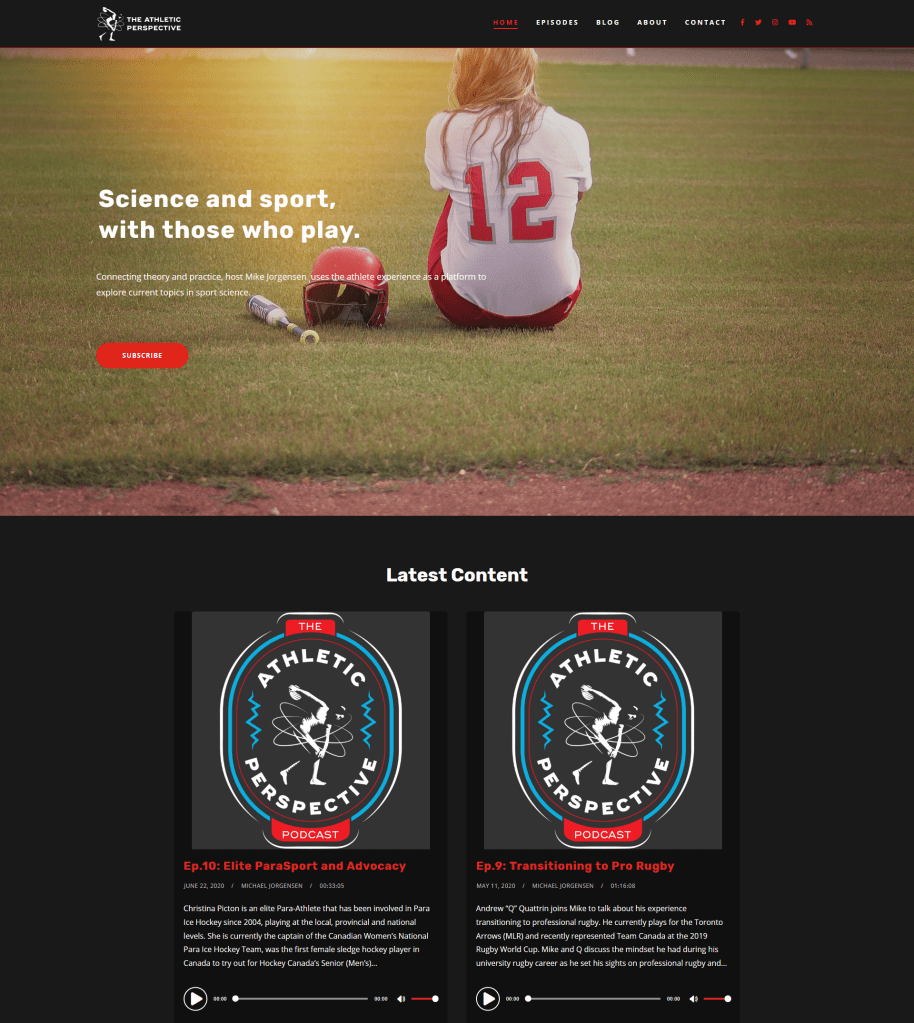
- Website – AthleticPerspective.com
- Website builder – WordPress
- Template – Tusant podcast theme
- What we like about it –
- Clean and informative header section with a background image, description and a subscribe button.
- Easy to find the latest episodes and see a page with all episodes. The header background image is great! It gets you right into the exact feeling and atmosphere the podcast intended to. It’s easy to subscribe and follow on social media (in the navigation and in the button).
- What we think they can improve –
- The audio player is a bit basic on the homepage, but looks better on the episode pages.
11. Serie A Chronicles

- Website – SerieAChronicles.com
- Website builder – Beamly
- Template – Miles
- What we like about it –
- Bold color scheme that matches the podcast branding and artwork. Good color combinations and consistency over the different pages.
- Homepage displays the podcast and host information, several recent episodes along with category filters.
- The sticky audio player looks really nice and features a semi-transparent background so it blends well with the rest of the site.
- What we think they can improve –
- We’d love to see one or two additional content sections on the homepage.
12. Podcastica Podcast Network
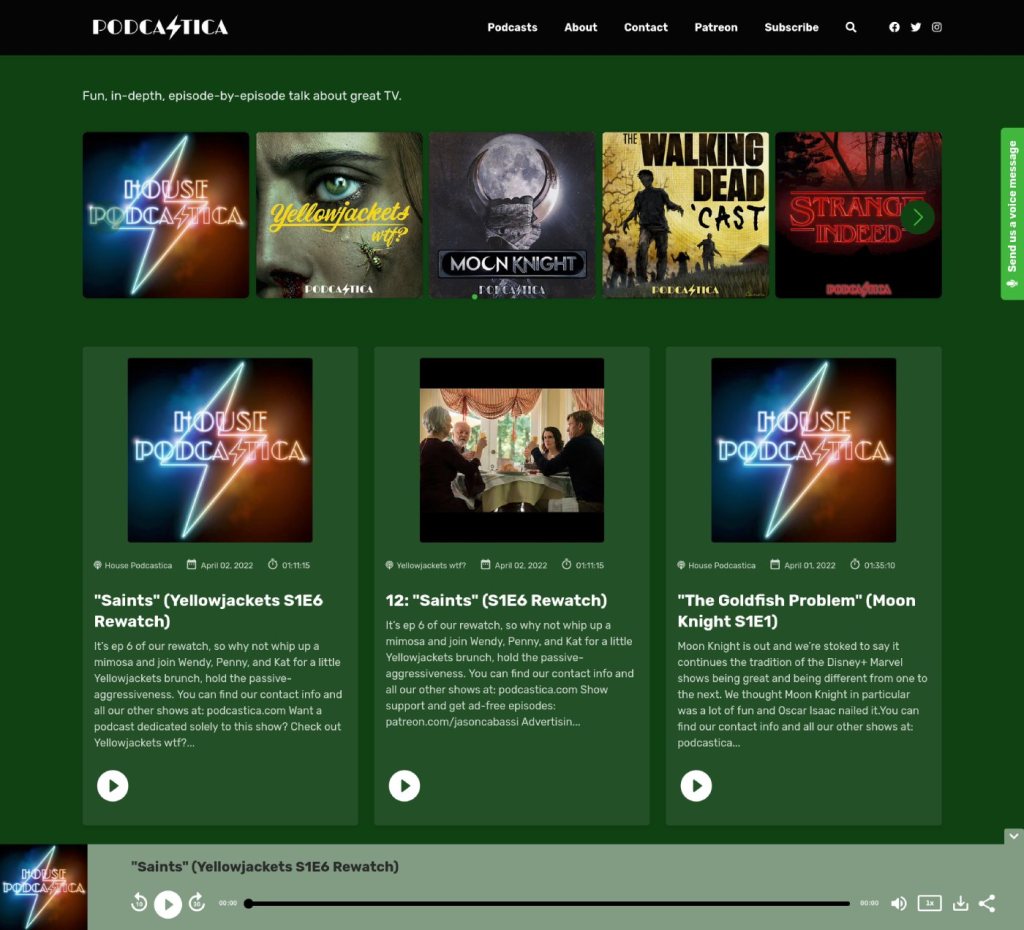
- Website – Podcastica.com
- Website builder – Beamly
- Template – Dizzy
- What we like about it –
- Clean design with multiple podcasts at the very top of the homepage, then a mixed stream of episodes from all shows right below.
- Sticky / Continuous audio player that plays across all pages.
- Dedicated page with a list of all Podcasts, standalone pages for episodes.
- Lots of additional content, transcripts and links.
- What we think they can improve –
- More images could add some eye-catching element to the homepage.
13. Smartless Podcast
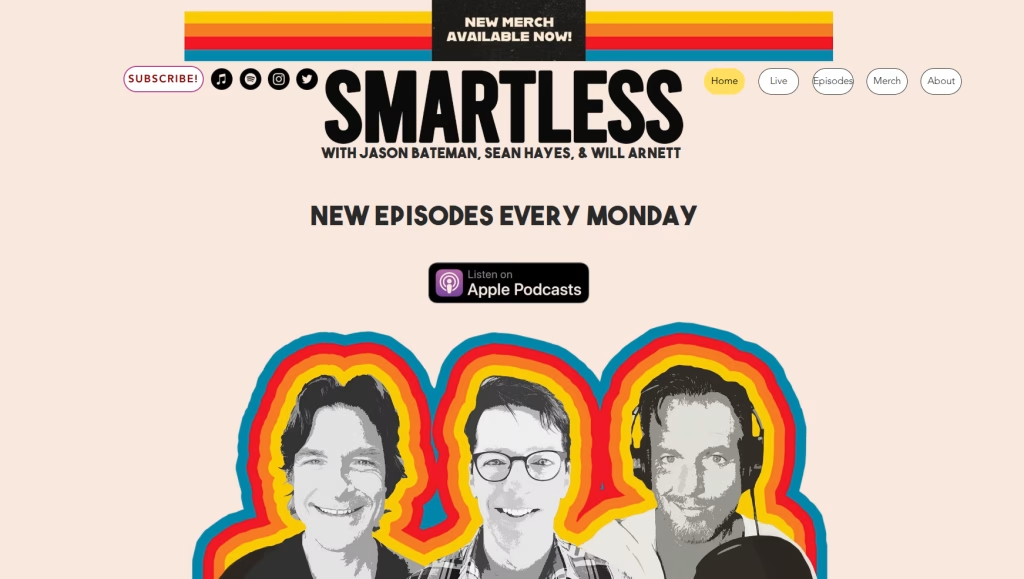
- Website – Smartless.com
- Website builder – Wix
- Template – Custom
- What we like about it –
- Really nice homepage hero with consistent style.
- What we think they can improve –
- No episodes on the homepage.
- Navigation looks outdated.
- Only linking to Apple Podcasts on the homepage is questionable (it’s the 3rd most popular platform) and there are no subscribe/follow links to other platforms.
14. Deck the Hallmark Podcast
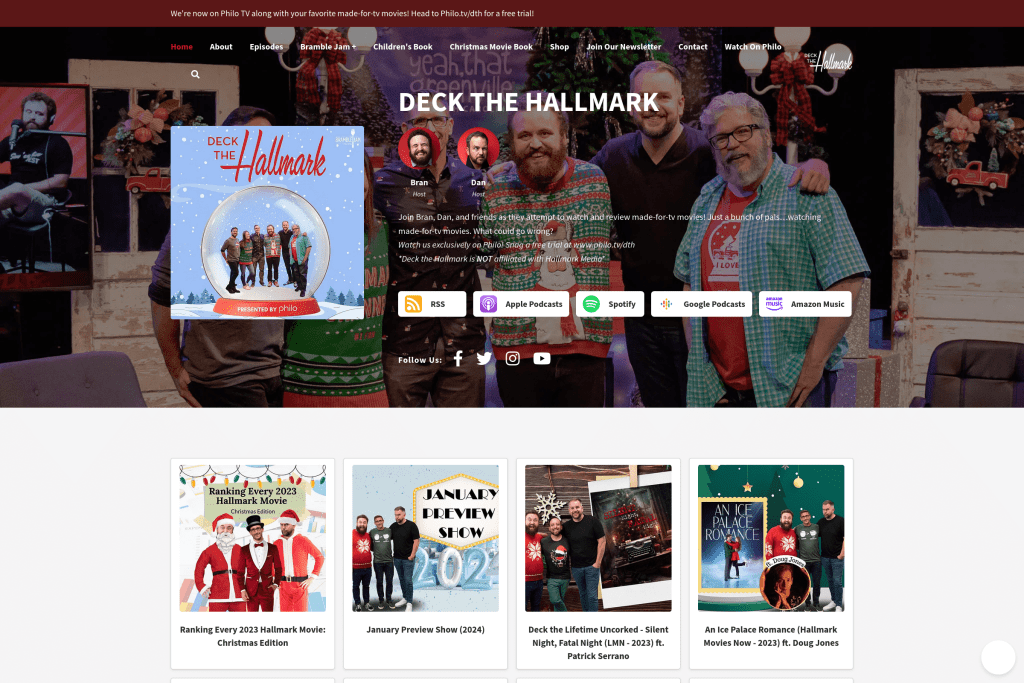
- Website – DeckTheHallmark.com
- Website builder – Beamly
- Template – Blakey
- What we like about it –
- It’s Christmas every day with this podcast! The site’s design and artwork definitely gives the right December vibes all around.
- The top section of the homepage displays the podcast info (title, description, artwork and subscribe/social icons) and host information.
- Homepage features all the 12 most recent episodes, which is great!
- The website uses an informational top-bar banner, and even an email opt-in popup. Great CTAs that can catch visitors’ attention.
- What we think they can improve –
- We would love to see them adding an audio player on the homepage episodes or perhaps a sticky audio player option. It’s great when visitors can listen right on the first page the load.
15. The Unnoticed Entrepreneur Podcast

- Website – TheUnnoticed.cc
- Website builder – Beamly
- Template – Trane
- What we like about it –
- Bold color scheme, clean homepage filled with media and social proof.
- Multiple “depth” pages with prior guest profiles, resources, contact and more.
- What we think they can improve –
- A few touches to the homepage can help polishing out the visiting experience.
16. Active Action Lab
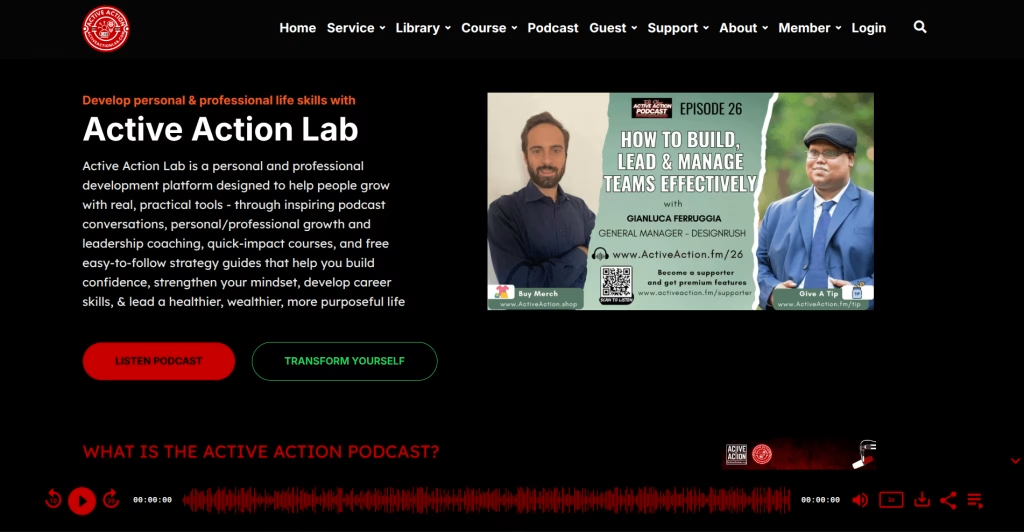
- Website – ActiveActionLab.com
- Website builder – Beamly
- Template – Dizzy
- What we like about it –
- A bold color scheme, with clean layout including diverse sections on the homepage showcasing all different content formats – podcasts, videos, articles, courses and more.
- Strong podcast membership program CTA block on the homepage.
- Featuring info about the guest and guests from the show.
17. Serial Podcast
You can’t talk about podcasts or podcast website examples without mentioning Serial podcast. Although it’s a custom built website, meaning you can’t use the same platform or template to build it, you can definitely learn and borrow ideas from their website.

- Website – SerialPodcast.org
- Website builder – Custom
- Template – N/A
- What we like about it –
- Main design and color scheme are both great.
- Each episode has a background image that is related to that specific episode.
- It’s so easy to subscribe, download or follow their social media.
- Easy to listen to the episode straight from the main page.
- When clicking on the play button, a sticky audio appears. This sticky audio lets you scroll across the pages without stopping the episode. It really helps when you want to read more about the episode or navigate throughout the site.
- What we think they can improve –
- Podcast artwork images on directories are usually square and not in landscape ratios like on Serial’s website.
- There are just 2-3 subscribe options, many listeners would prefer to subscribe on other platforms.
- Google PageSpeed insights score is quite low.
18. Monde Numerique

- Website – MondeNumerique.Info
- Website builder – Beamly
- Template – Blakey
- What we like about it –
- Great consistency of colors all around the website.
- Beautifully customized homepage with lots of custom sections, CTA blocks, and a sidebar.
- Slick audio player – using a sticky podcast audio player which allows the listener to scroll down and switch pages without stopping the flow.
- The episode page includes very detailed show notes, including audio timestamps, quotes and more.
- What we think they can improve –
- The footer could look better or provide more value to the visitors.
19. Reconsidering Podcast

- Website – Reconsidering.org
- Website builder – Squarespace
- Template – Custom
- What we like about it –
- Playful design with a nice background image on the top of the homepage.
- Subscribe icons on the homepage and individual episode pages.
- Nice choice of colors across the site.
- Different image for each episode – good to mix things up when browsing pages with multiple episodes.
- What we think they can improve –
- There’s no way to listen directly from the home page, or even the episodes page. However, you must click on the episode page and then listen there.
- Audio player is too basic.
- Too many broken links on the episode transcripts.
- The site is a little dull in terms of added features like a voicemail widget, reviews, custom pages (like a guests page) and more.
20. Big Meow Podcast
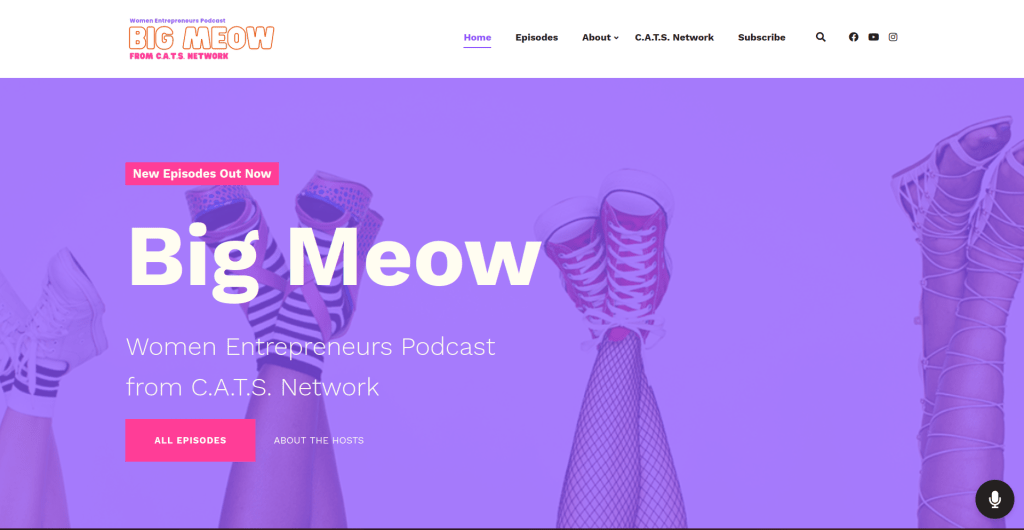
- Website – BigMeowPodcast.com
- Website builder – Beamly
- Template – Duke
- What we like about it –
- Fresh design with a great hero section at the top – nice colors, background image, and CTA buttons.
- The homepage includes episodes, info about the hosts, reviews, and posts from Instagram – great variety!
- We love the color scheme and artwork used across the site.
- What we think they can improve –
- Font and typography is a little small in some areas or inconsistent, could be an easy improvement!
21. The Foil Life Podcast
- Website – FoilLifePodcast.com
- Website builder – Beamly
- Template – Monk
- What we like about it –
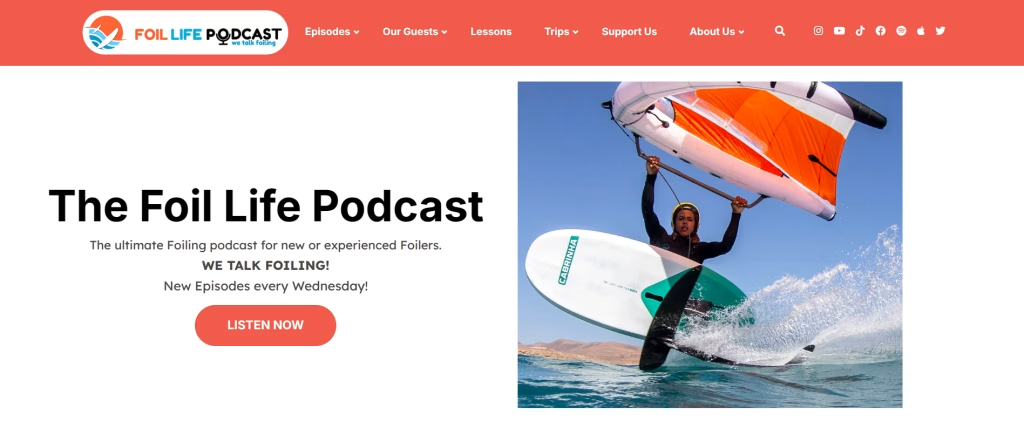
- The podcast site has a great look and feel to it. With plenty of bright colors and images, the homepage really pops out. It includes a few of the recent podcast episodes and a full size video player on the homepage as well. The design and color schemes is consistent across all the different pages.
- Main site navigation is well structured and includes a bunch of sub-menus with relevant resources.
- What we think they can improve –
- Some spacing can be improved on the homepage, and perhaps another content section or two.
22. The James Altucher Show
- Website – JamesAltucherShow.com
- Website builder – Beamly
- Template – Miles
- What we like about it –
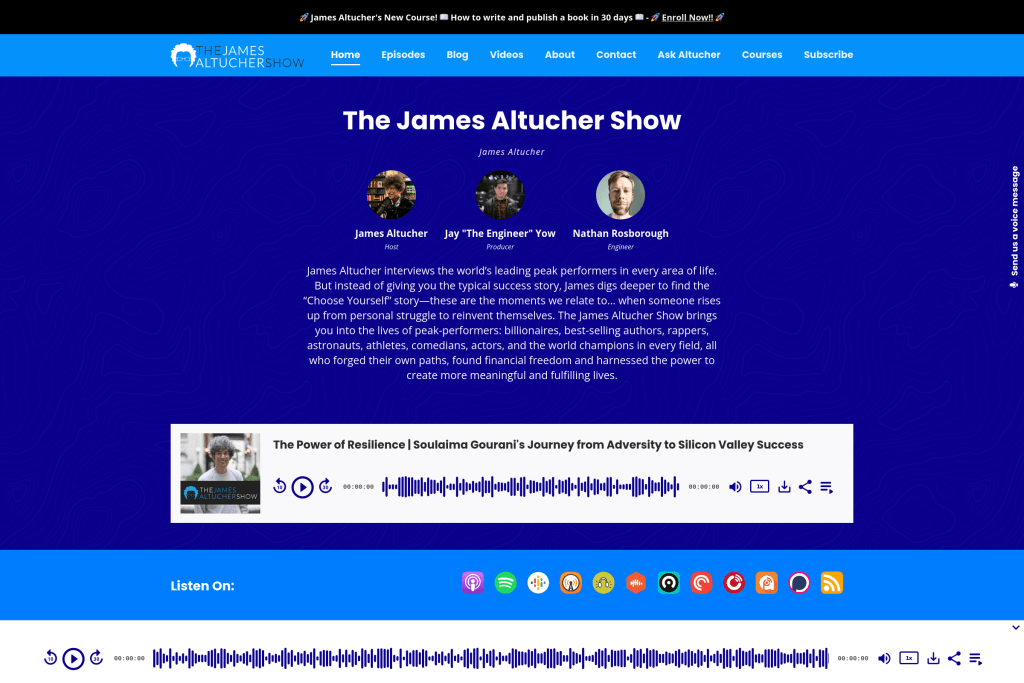
- This website is very well structured – from the top header banner (great for announcements!), to the navigation/header area with a nice logo that blends well, all the way to the hero section that has all the information one would want to read about the podcast – The title, host info, description, most recent episode and subscribe icons.
- The sticky audio player is beautifully designed with a soundwave-style progress bar, and follows anywhere you go on the site.
- The homepage also includes recent episodes, blog posts, videos, and podcast reviews. That’s a really great variety of content.
- There’s a full section with info about the hosts, right on the homepage – that’s great!
- What we think they can improve –
- Not much to say here – the site looks really good.
Podcast Network Website Examples
23. WRKdefined Podcast Network

- Website – WRKdefined.com
- Website builder – Beamly
- Template – Trane
- What we like about it –
- A bunch of different podcasts listed right there on the homepage.
- Sponsors section and recent episodes on the homepage.
- Very clean design and layout all around the site.
- Each individual podcast page includes a list of all episodes, a subscribe icon & social icon list.
- What we think they can improve –
- Top section of the homepage contains the network name and description, but could be a little more elaborate.
- We’d add a few more pages to the site’s navigation or activate podcast memberships features.
24. Health Unmuted Podcast Network
- Website – HealthUnmuted.com
- Website builder – Beamly
- Template – Blakey
- What we like about it –
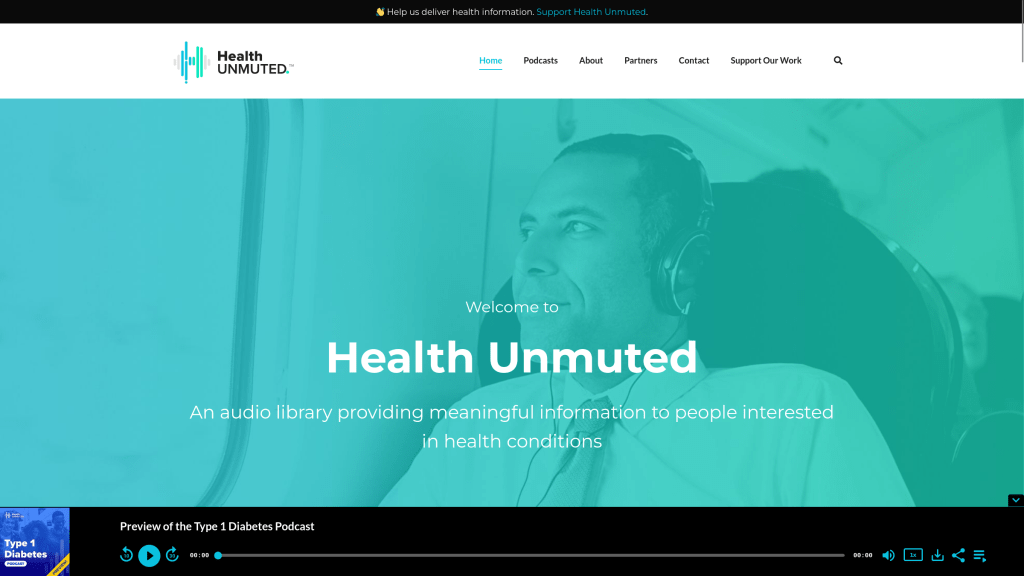
- Custom full-width header with text and a background image – main info about the network and podcasts is available right at the top of the site.
- All shows appear slightly below the top section, in a beautiful layout with really nice similarities between the different show artwork images.
- Custom individual podcast page layouts.
- Plenty of CTA and forms available.
- What we think they can improve –
- Some more consistency around the colors could be great.
25. Optimal Living Daily Network

- Website – OLDPodcast.com
- Website builder – Beamly
- Template – Trane
- What we like about it –
- Optimal Living Daily is a very popular podcast network, with half a dozen of shows that specialize around specific daily living topics. We really love the artwork for all shows, which keeps the same structure and highlights a different topic every time.
- We love the straightforward homepage layout with a detailed hero section, a list of all shows, and the recent episodes below where you can instantly play episodes right on the homepage.
- Custom individual podcast page layouts.
- Good color selection all around.
- What we think they can improve –
- Another informational section on the homepage can be great.
26. EarzUp Podcast Network
- Website – EarzUp-Podcast.com
- Website builder – Beamly
- Template – Monk
- What we like about it –
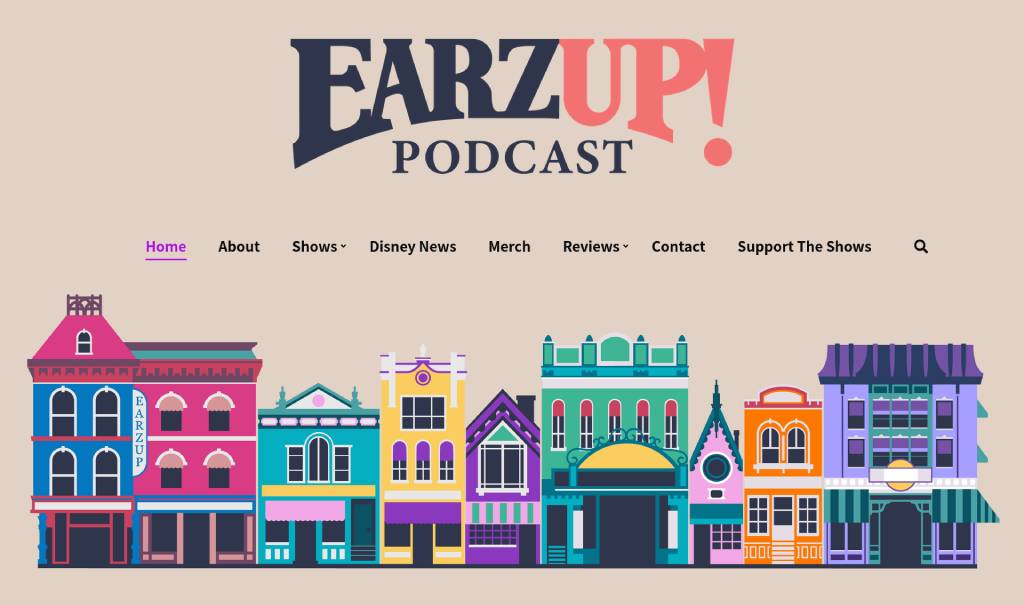
- A beautiful header/hero section on top of the homepage with an eye-catching logo and a beautiful custom illustration.
- The most recent episode is featured right below the homepage header, with a large artwork and audio player.
- Different shows are featured directly on the homepage or on a dedicated “Shows” page.
- Hosts and Guests are featured across the site.
- Multiple dedicated custom pages for shows, merchandise, and more.
- What we think they can improve –
- Some spacing and typography styles are inconsistent – updating those would really boost the look & feel of the site!
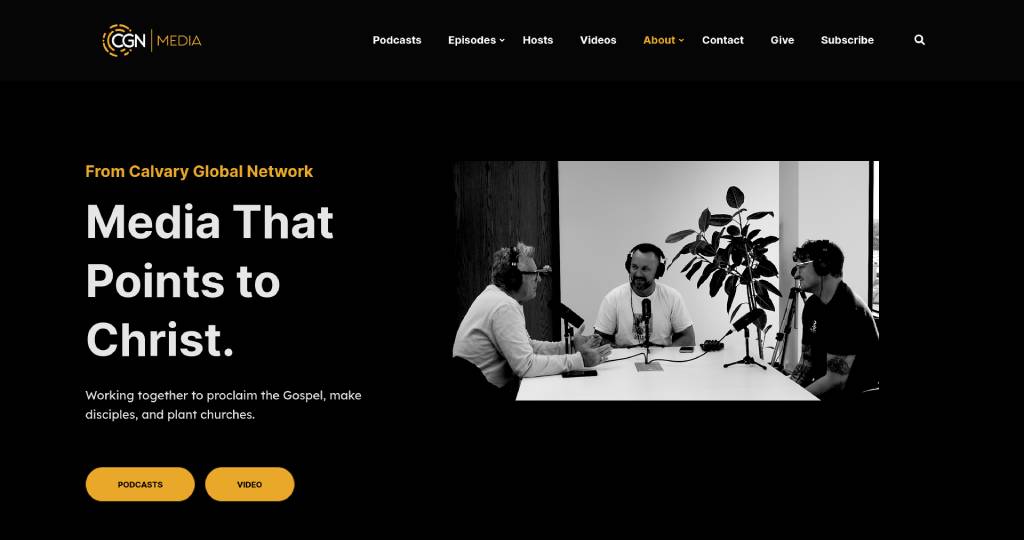
27. CGN Media
- Website – CGNMedia.org
- Website builder – Beamly
- Template – Dizzy
- What we like about it –
- Beautiful branding, colors and layout on the homepage. We always appreciate consistent design that matches with the overall brand.
- Large selection of content – between dozens of podcasts and several YouTube channels – there’s tons of content on this website.
- Reviews and more informational sections on the homepage.
- What we think they can improve –
- Hard to find for this one! The site looks great overall – we’d perhaps opt to add a sticky audio player but that’s not a must.
28. BingePods

- Website – BingePods.com
- Website builder – Beamly
- Template – Dizzy
- What we like about it –
- A beautiful site for one the largest podcast networks in India.
- Homepage displaying recent episodes at the top followed by a bunch of podcast sorted by categories.
- Several CTAs and email opt-in forms directly on the homepage.
- What we think they can improve –
- So much content on one website can get a little overwhelming, but Bingepods are doing a great work of streamlining the content and display thousands of episodes (from hundreds of different podcasts) on the same site.
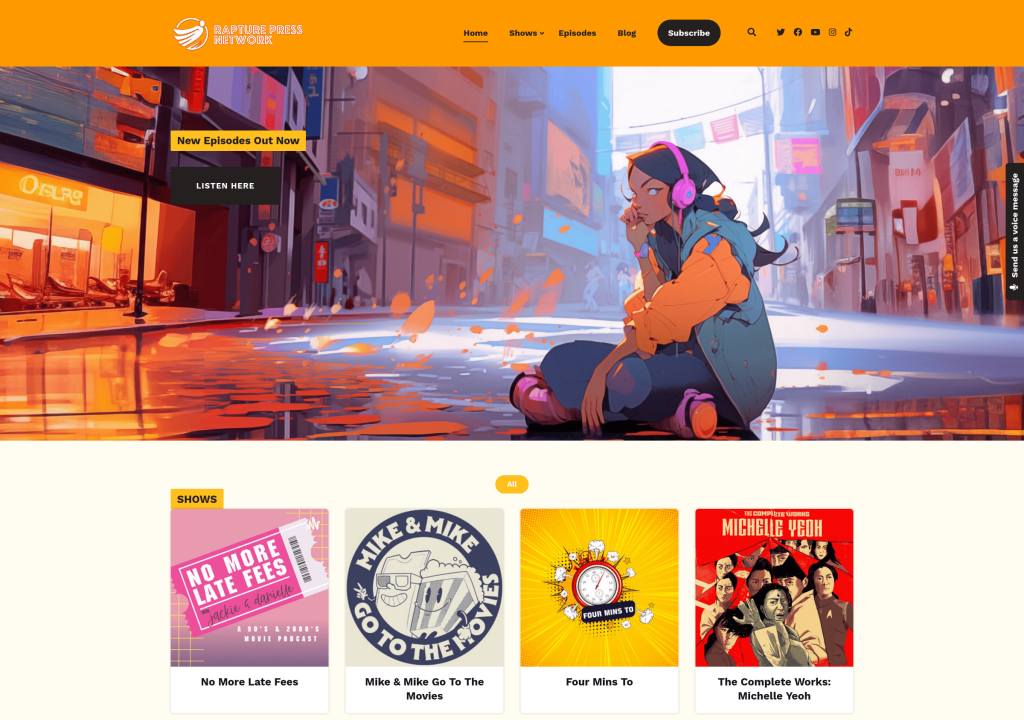
29. Rupture Press Podcast Network
- Website – RupturePress.com
- Website builder – Beamly
- Template – Duke
- What we like about it –
- The header/hero section on the homepage is really great, thanks to the beautiful background image that take the full width of the page.
- After the top section, there’s a list of shows included in the network – each with a unique artwork.
- Recent podcast episodes, YouTube videos, and blog posts follow right after – that’s a great way to feature different types of content on the same page.
- The sticky audio player follows the visitor on every page and makes it easy to listen to episodes of the network.
- What we think they can improve –
- Some buttons lack proper spacing.
- We would recommend adding some text/content about the network somewhere on the homepage.
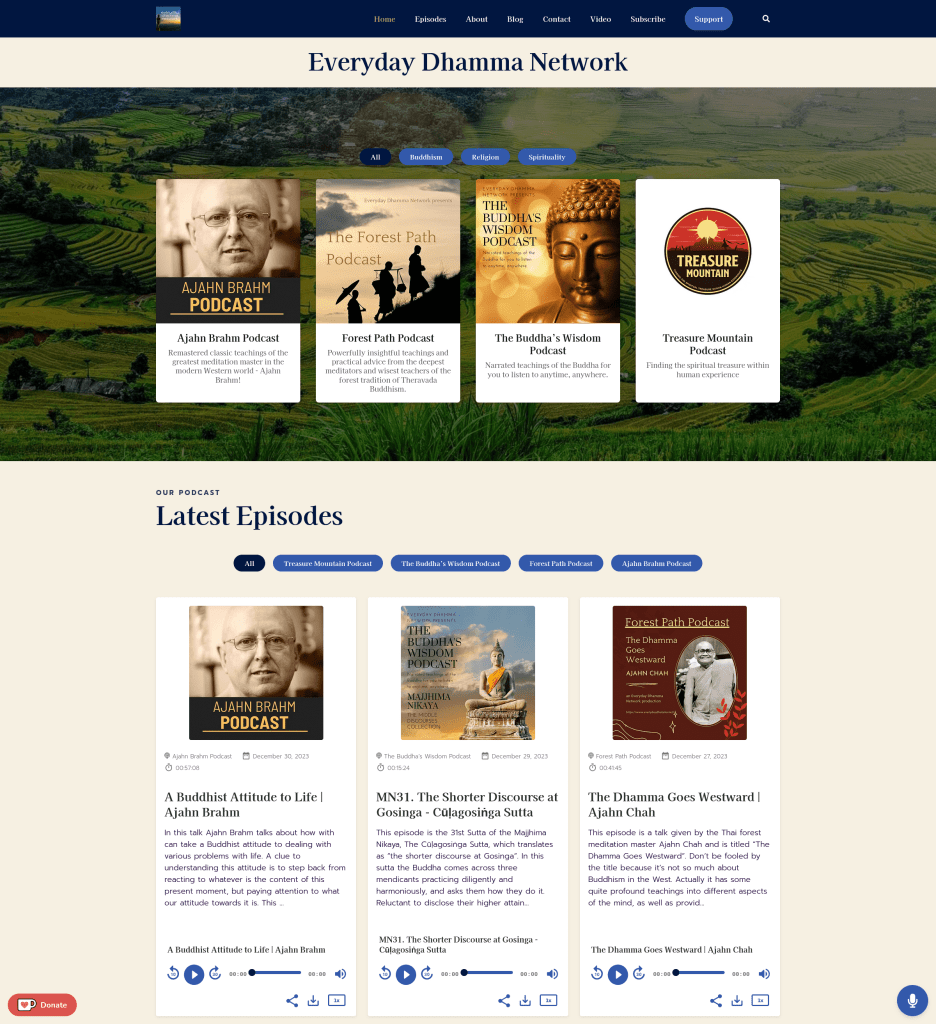
30. Everyday Dhamma Network
- Website – EverydayDhamma.net
- Website builder – Beamly
- Template – Monk
- What we like about it –
- Great selection of colors and fonts all across the website.
- The background images and design matches the topics of the podcasts in the network.
- The homepage features all podcasts on the network, the latest episodes, subscribe buttons and some text.
- What we think they can improve –
- While showing a blog post on the homepage is great, there’s only one post – adding a couple more would look even better.
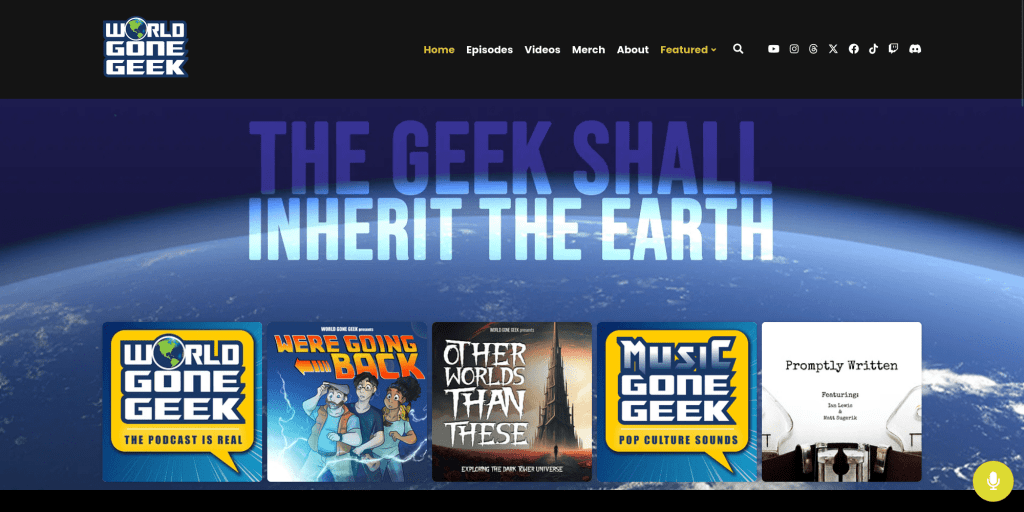
31. World Gone Geek Podcast Network
- Website – WorldGoneGeek.com
- Website builder – Beamly
- Template – Dizzy
- What we like about it –
- Great hero section with a large heading text, beautiful background image, and artwork of podcasts in the network.
- The homepage features recent episodes, a voicemail widget button, social & subscribe icons, and more.
- Instagram posts are featured in the footer.
- What we think they can improve –
- The homepage could use a little more info or a blurb about the network.
Checklist for Creating a Podcast Website
You may be wondering what other features a podcast website design should include. Here are some useful tips to take your podcast website to the next level.
Here are several examples you can add to your to-do list and build a beautiful website:
- Play your episodes – Make it easy to listen to all of your podcast episodes. Don’t hide the audio player way inside your site. Make sure the podcast audio player design fits your podcast by changing the colors or controls. Use a sticky audio player (if available) to keep your audio playing while your visitors browse across the website. Don’t even think about using the default browser audio player, your podcast deserves more than that!
- Episode lists – Display your episodes in a list on the main page or on a dedicated page for your podcast episodes (or both!). You can also include an option to listen to the episodes directly from there.
- Podcast description – Share some info about your podcast right above the fold. Provide the needed background to those that stumbled upon your website without knowing much about your podcast.
- Single episode pages – Create a unique page for each episode in the episode list. Include information about the episode (show notes, timestamps, transcript) and an audio player. This is great for podcast SEO.
- Podcast subscribe buttons – There should be an easy way to subscribe to your podcast on the website.
- Social and sharing buttons – Make it easy for your visitors to follow you on their favorite social media channels. Also, listeners should be able to share the episode in one click (to social media or communication apps).
- Customizable – Even though you are using a template, make sure it includes plenty of options to customize anything and everything to fit your needs.
- Private/Premium content – If some of your content is limited to registered or paying members, creating your membership website might make a whole lot of sense.
- Monetization – Now that you have a website, why not try and earn a living out of it? A good website platform comes with built-in monetization tools that you can leverage to generate income.
- Technical details are important – Page speed and SEO optimization are crucial. Make sure listeners can easily find your website and swiftly browse through it. Prioritize accessibility too: readable font sizes, strong color contrast, descriptive alt text, and transcripts.
What to look for in great podcast website examples
We selected these podcast site examples based on design quality, listening UX, discoverability features, and clarity for first-time visitors.
If you want to use these podcast website design examples to improve your own site (and not just browse designs), focus on these elements:
- Make listening immediate – a visible play button or sticky podcast player, plus subscribe/follow links.
- Make discovery easy – an episode archive with filters/search, and separate episode pages that are easy to share.
- Publish transcripts and show notes – transcripts improve accessibility and can support long-tail SEO.
- Build an owned audience – email opt-ins, reviews, guest pages, and clear calls to action.
- Keep it fast and readable – strong contrast, clean typography, and good mobile UX.
Why Every Podcast Needs a Website
While podcast directories like Spotify and Apple Podcasts help listeners find shows, a dedicated website gives you something directories cannot – ownership. Here’s why podcast websites matter:
- SEO and discoverability – Episode pages can rank on Google for topics you discuss, bringing new listeners who’ve never used a podcast app.
- Audience ownership – Build an email list instead of relying on algorithm changes.
- Monetization control – Sell memberships, merchandise, and premium content directly.
- Brand credibility – A professional site signals authority to sponsors and guests.
- Content hub – Host transcripts, show notes, blog posts, and resources in one place.
How to make a Podcast Website
Creating your own podcast website may sound daunting, especially if you’ve never worked with websites before, but these days it can be a super easy process.
If you’re looking for the full step-by-step process, see our guide on how to create a podcast website.
Website builder platforms like Beamly are tailored for non-technical users, and packed with automations around podcasting (like importing your episodes, reviews and transcripts), AI features, and much more. Here’s a quick-start guide for using Beamly:
- Sign up to create your account on the Beamly dashboard
- Go through the setup wizard to import your show, choose a podcast template, and set up your custom color scheme.
- Start customizing your website’s look and feel, add more content to your “About” page, and connect socials. You can also connect a YouTube channel to auto-import videos and surface both audio and video on your site.
- That’s it! Connect your own domain and publish the website.
- Look into Beamly’s paid pricing plans and choose the one that works best for your project.
In general, you’ll need to choose a website platform, a podcast hosting platform, design your website and upload relevant content. Besides your actual podcast, you could include content such as blog posts, a shopping page for podcast merchandise or even a section for press. While you can hire a website designer to help you, there’s also a lot of tools you can try that are more accessible for those who are less familiar with website creation.
Podcast Website Templates
To make your website shine and look better than the rest, you’ll need to make sure it’s beautifully designed, equipped with enough content, and structured properly. While you can always use the DIY approach and build a website from scratch, using a template can cut down the amount of work. You don’t even have to be a designer or web developer to launch a top podcast website, but choosing the right template and website builder is key.
Many podcasting websites are created the hard way – either developed from scratch or updated manually every time a new episode is published. A podcast site template would make your life much easier, and choosing a platform that specializes in podcasting (like Beamly) would be key!
With a website template, you can get the right inspiration for your own project, start editing from a ready-made design, and just move a lot faster than when creating a site from a blank canvas.
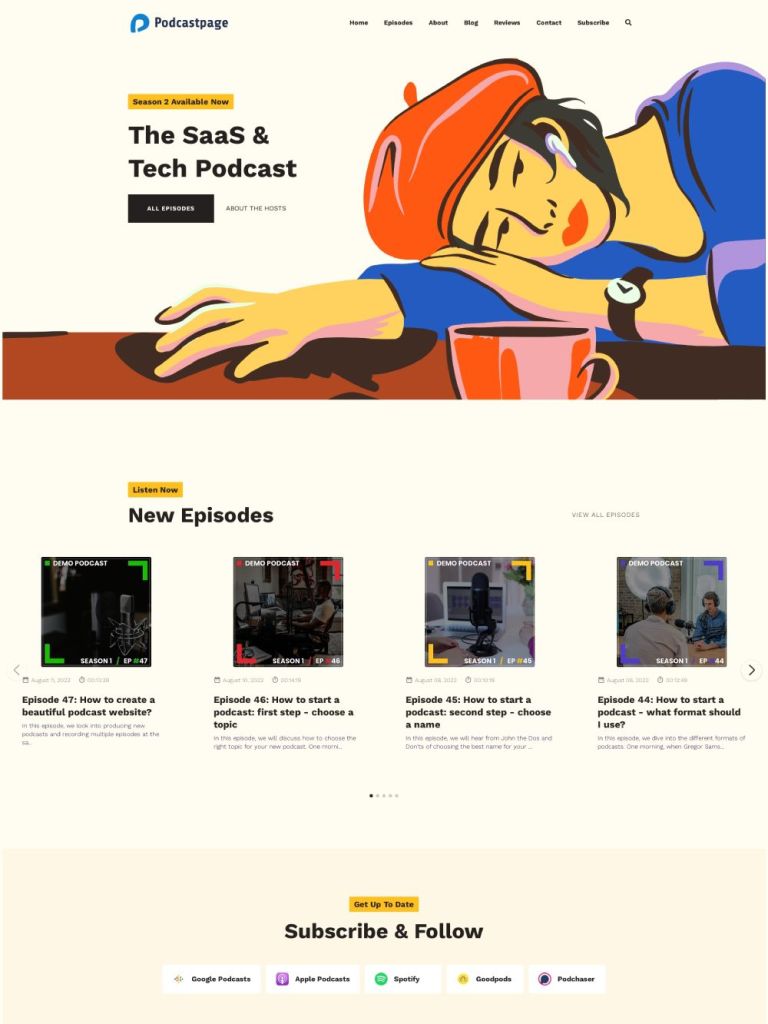
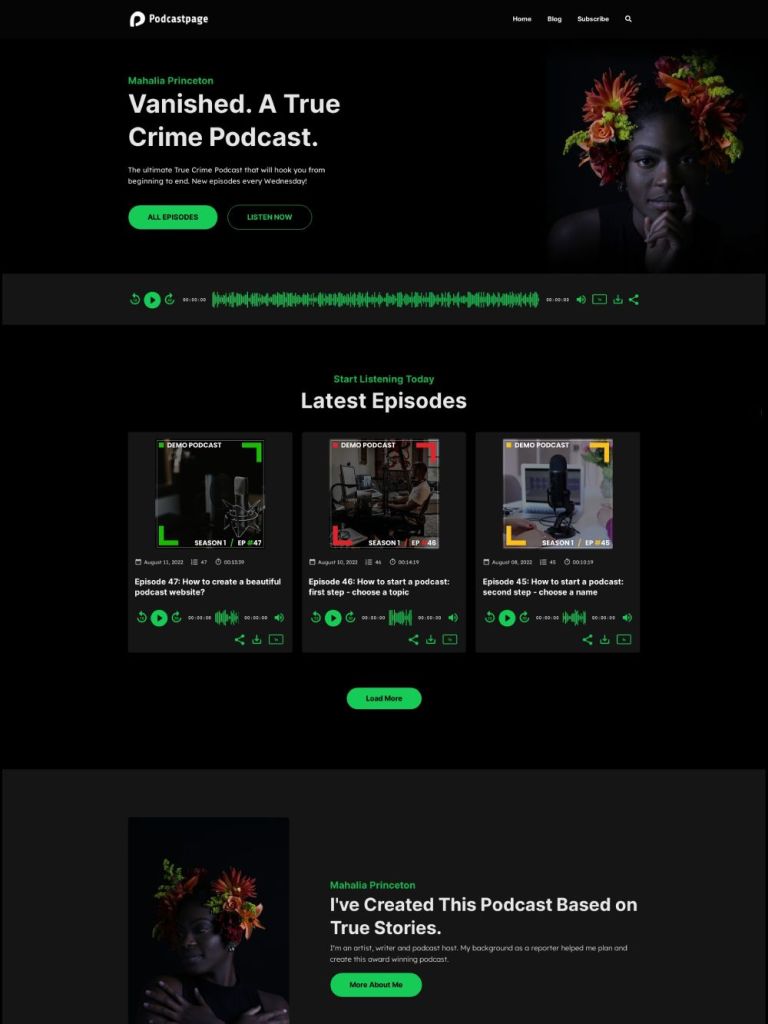
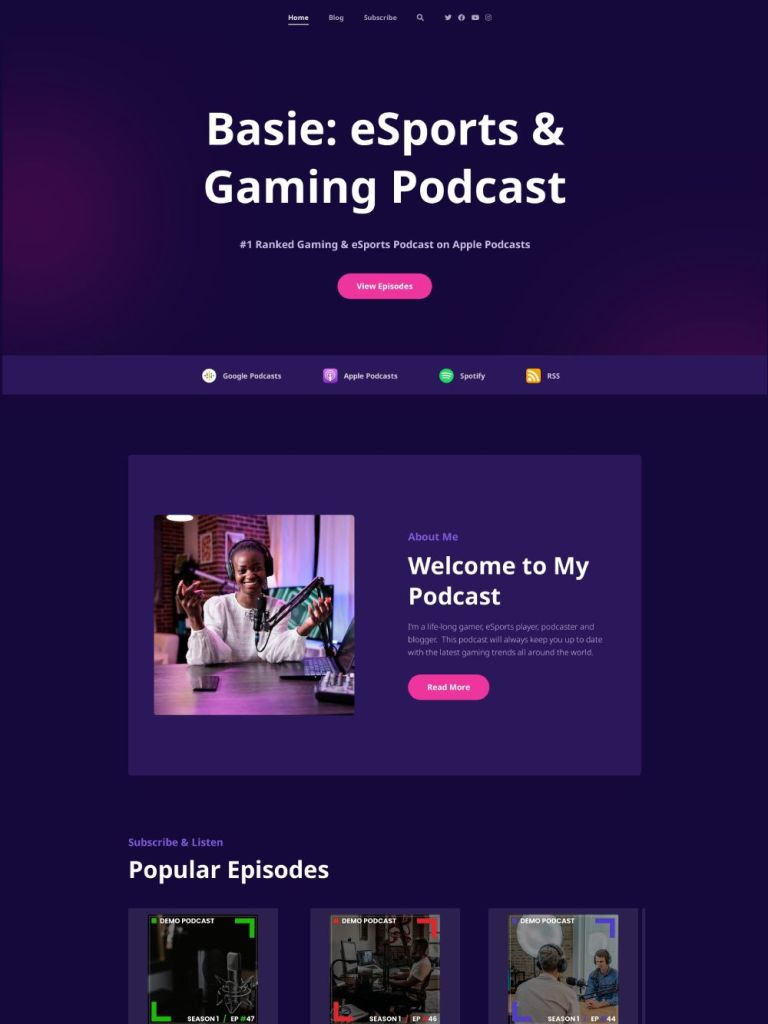
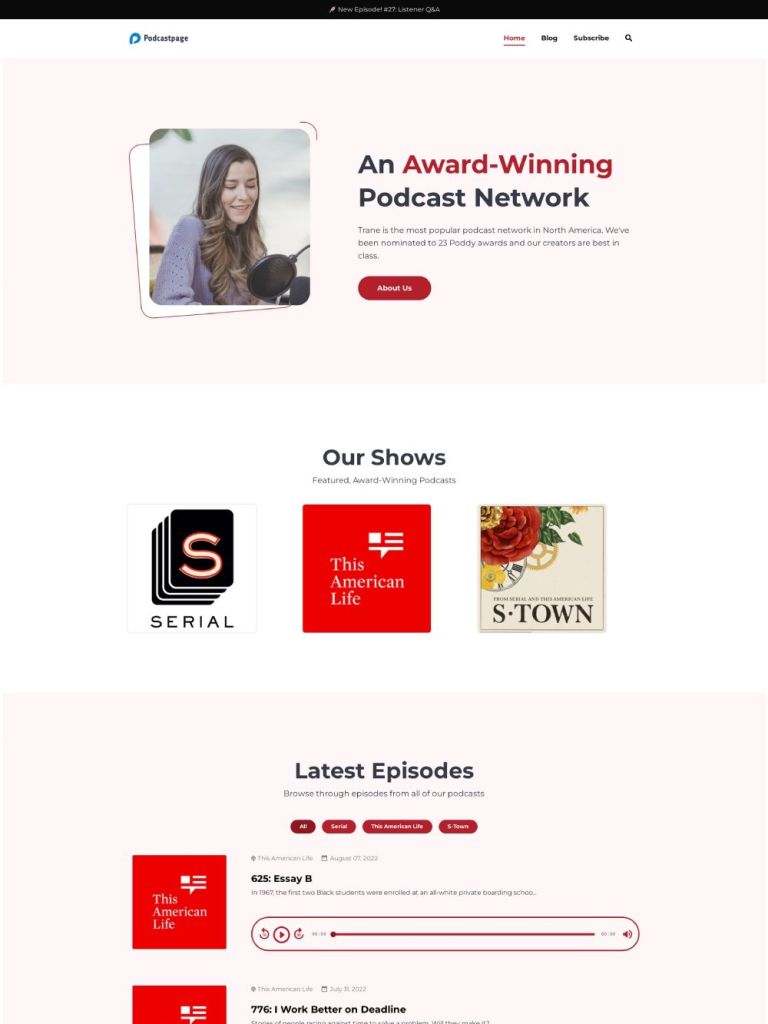
When working with Beamly, you get the most beautiful podcast website templates out there, so you’d be ready to launch a beautiful site in just a couple of minutes.
Here are some of the most popular templates available only on Beamly –


Case Study: The Regen Brands Podcast
Building a podcast website doesn’t mean your site must look like dozens of other sites. Furthermore, you’d probably want to make your site look as unique as possible, on-brand and make it attractive and eye-catching. The Beamly website platform is built just for that. It gives you 100% control over the layout, design and is as flexible as it can get for a podcast website.
One of our favorite examples for showing the design versatility of Beamly is the Regen Brands podcast website, which includes stunning design, beautiful homepage layout and warm colors:
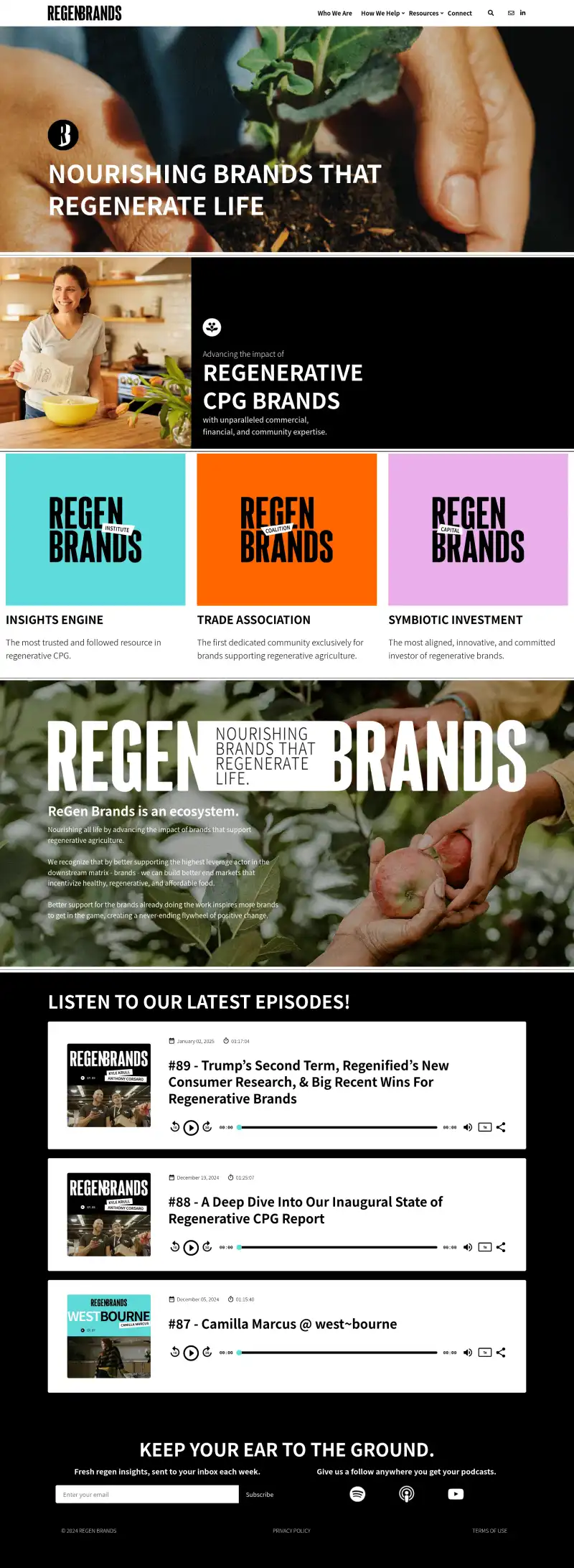
In terms of features, there are really some key ideas that your website should include by default, when thinking about podcast websites. Here are our favorite ones, all included within Beamly:
- Host your podcast natively on Beamly or import from any host.
- Built-in audio player.
- Automatically build your website based on your podcast RSS feed.
- Integrate with YouTube to import videos automatically.
- Full blogging features.
- Import podcast reviews from Podchaser and Apple Podcasts.
- Transcript generator
- Automatically import podcast subscribe buttons.
- Full design flexibility (drag & drop page editor).
- Focus-mode writing tool (for long-form blog posts or episode shownotes)
- Paid podcast subscriptions & membership features to monetize your content.
- Private podcast features.
- Premium / Gated content with paywalls (only available for signed-in or paid members).
- Email opt-in forms.
- Built-in comment sections.
- Guest intake forms.
- Voicemail recording widget.
- Built-in SEO-analysis tools.
Helpful next steps
- Build your search and SEO strategy with this podcast SEO guide.
- Compare podcast website platform options in the best podcast website builder review.
- Browse ready-made podcast website templates.
- Host, distribute and monetize your podcast with professional podcast hosting.
FAQ
What should a podcast website include?
Most great podcast websites include:
- A homepage with the show description, hosts, and subscribe/follow buttons
- An episodes page (with search or filters if you have a lot of episodes)
- Separate pages for each episode (show notes, timestamps, transcript)
- An about page and a contact page
- A clear call to action (newsletter, membership, donations, merch, or reviews)
Should every podcast episode have its own page?
In most cases, yes. Individual episode pages are helpful for SEO, sharing, and internal linking. They also give you a place to publish show notes, timestamps, and a transcript. If podcast SEO is a priority, see our guide: podcast SEO.
Do transcripts help podcast websites rank on Google?
Transcripts can support long-tail SEO because they add relevant, indexable text to each episode page. They also improve accessibility. If you want to generate transcripts faster, Beamly includes an AI transcript generator.
What is the best podcast website builder?
It depends on the features you need. Some creators want maximum flexibility, some want a general visual builder, and many podcasters prefer a platform built for podcasts. Beamly is an all-in-one platform with podcast templates, an embedded player, automated episode imports, transcripts, and memberships. See the full comparison here: the best podcast website builder review.
Can you create a podcast website for free?
Sometimes, but free options usually come with trade-offs (limited customization, branding you can’t remove, fewer SEO controls, and fewer monetization options). If you’re considering free options, see: free podcast websites.
Podcast hosting vs podcast websites: what’s the difference?
A podcast host stores and delivers your audio files and RSS feed to platforms like Apple Podcasts and Spotify. A podcast website is your owned destination where people can discover episodes, search archives, read show notes/transcripts, and join your email list. Most serious podcasts use both.
Should you use a one-page podcast website or a full website?
If your show is new and has a small episode library, a one-page layout can work as a starting point. As your catalog grows, a full website usually performs better because it supports individual episode pages, better internal linking, and easier navigation for listeners. When you just mirror a few episode on your own domain, this often doesn’t do much in terms of SEO or audience engagement.
Conclusion
In conclusion, this guide reviewed some of the best podcast website examples and shared practical tips to help you build a stronger podcast website.
The right platform and structure matter. A podcast-focused setup with clean design, clear subscribe paths, and SEO-friendly episode pages will usually outperform a generic setup.
Having high quality content is the most important aspect of podcast websites – make your podcast attractive to your listeners, and ensure your site includes high quality content, and the rest will follow. There is no doubt that a website is extremely helpful to podcasters, whether they are professionals who record 10 episodes a week or individuals who do it as a hobby. A website can help you grow your podcast, find more listeners, and get increased engagement from your existing audience.
And that’s all for now folks, you now know everything about podcast websites. Happy podcasting!