If you want to run your podcast as a business, you’ll need to have all the tools in place to attract sponsors, media outlets, and potential guests. This includes a well-crafted podcast media kit that highlights your story and audience value. However, you might not know how to get started with your press kit.
Well, it might be easier than you think, especially if you create your podcast website with Beamly.com. This is because you’ll have access to ready-made media kit templates that you can simply edit with your information.
In this post, we’ll take a closer look at what a podcast media kit is and why you need one. We’ll also list the elements you need to include in your kit, and review some examples. Finally, we’ll show you how to create your media kit with Beamly. Let’s dive right in!
Why You Need a Podcast Media Kit
A podcast media kit is like your podcast’s resume. It shares key details about your show, like follower and listener numbers, popular topics, and notable guests.
Typically, you publish your podcast media kit on your website. However, you could also create a PDF copy to send to sponsors and other interested parties.
With a solid media kit, you can:
- Demonstrate value to sponsors and media by showcasing engagement and reach.
- Built credibility and professionalism, and also position yourself as an expert in your niche.
- Streamline outreach by making it easy for interested companies or individuals to access the information they need directly on your website.
Plus, creating a media kit provides an opportunity to reflect on your accomplishments and growth. The data will help you see what you’re doing right and what you need to improve on.
What to Include in Your Podcast Media Kit
Your podcast media kit should be concise yet comprehensive. It should convey the most important details without being overwhelming.
So, here’s what to include in your press kit, with real-life examples.
1. Podcast Description and Host Introduction
Your media kit should start with a brief overview that answers the following questions:
- What is the podcast about?
- What makes it unique?
- Why should someone advertise on it, or work with you?
Remember to include key information like the genre and theme, target audience, and typical episode length & frequency.
You can include all of these details in a simple description, like the following example:
“Anthropology Cafe is a 30-minute weekly podcast exploring global issues and emerging challenges, catering to educators, academics, and students.
Here, you’ll also want to introduce yourself with a short bio (50–100 words) that highlights your experience and credentials. You might even want to tell people why you started the podcast, and what drives you to keep producing engaging episodes.
2. Key Metrics and Audience Demographics
This is where you share those impressive stats. Make sure to include:
- Total downloads and/or downloads per episode (average)
- Growth rate over time (e.g., 20 percent increase over the last 6 months)
- Social media following across platforms
- Engagement rate (comments, shares, reviews)
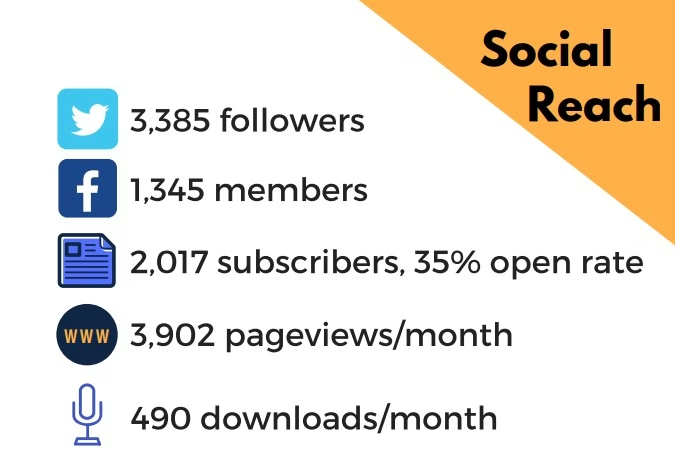
It’s a good idea to display your stats in a simple graph or chart. Visual data is easier to process and can be more impactful.
Here’s an example from the Podcast Brunch Club:
You’ll also want to share some information about your audience. This includes:
- Age ranges
- Gender
- Geographic location (countries or regions)
- Profession (e.g., educators, IT professionals)
- Interests
Here’s how Mixed Company presents its audience profile:

These audience demographics will help potential sponsors decide if your show aligns with their target market.
3. Testimonials, Reviews & Press
Social proof helps build trust. Try to include a few glowing listener reviews (from Apple Podcasts, Podchaser, etc.), as well as media features (with publication logos).
If you’ve won any awards or your podcast has been nominated for one, this is a good place to mention them.
You could also include any noteworthy guests (like industry leaders and influencers) in your podcasts. This demonstrates your network strength and reassures prospective guests or sponsors that you work with high-quality contributors.
4. Sponsorship and Advertising Packages
Now that you’ve hooked your sponsors, you’ll want to share your advertising packages with them.
Here’s an example from the Big Fat Positive podcast media kit:

It’s important to be very clear about your monetization options. You’ll want to state your:
- Ad formats (pre-roll, mid-roll, post-roll, or integrated sponsor segments)
- Pricing (if you’re not comfortable sharing this publicly, simply write “available on request”)
- Any bundle deals (ads and social posts, multi-episode packages)
You could even include example sponsor placements, so brands will know what to expect.
5. Your Promotion Strategies
Many sponsors will want to know how you promote your podcast. After all, if your episodes do very well through promotion, their adverts will have a wider reach.
Mention your active marketing channels (Instagram, TikTok, YouTube, LinkedIn, email newsletter), and whether you cross-promote with other podcasters or brands. If possible, include engagement metrics for your social channels.
6. Contact Information
Finally, you’ll want to include your contact details. Even if you have a dedicated contact page on your website, adding this information to your press kit will make it easier for interested people to get in touch.
You can create a form or invite people to contact you at your email address. This is also a good place to include links to your podcast platforms (Apple, Spotify, YouTube, etc.) and social media pages.
If you want to take things a step further, create a calendar booking link for sponsor calls.
How to Create a Media Kit in Minutes
Having a podcast website is an effective way to widen your reach. Here, people can find and listen to all of your episodes, read your blog posts, follow you on social media, reach out to you via your contact form, and access your podcast media kit.
Beamly.com makes it very easy to create a podcast website. It’s an all-in-one solution that includes professional templates, membership functionality, a customizable audio player, instant episode imports through RSS feeds, and a lot more.
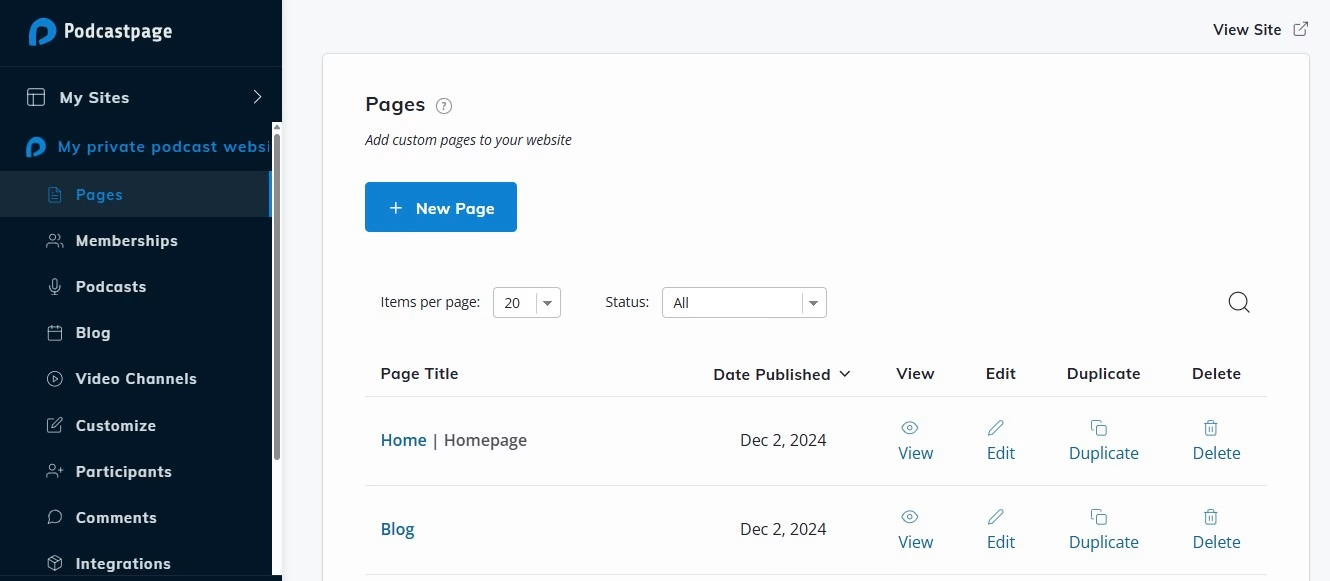
With Beamly, you can also create a dedicated media kit page on your website. Once you create an account, go to the dashboard and click on Pages. Then, select the New Page button:
Give the page a title, then click on the plus sign and go to Templates:

Under Page Templates, you’ll see an option called Media Kit. Click on it and drag it to the page:
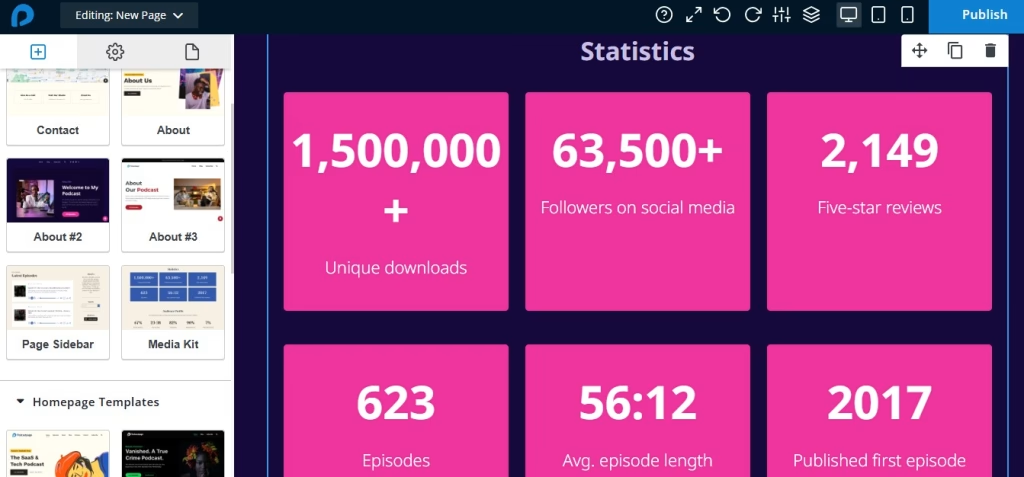
As you can see, the template includes essential sections like statistics, audience profile, reviews, hosts and featured guests, and more.
You can select any element on the page to edit the information and customize the styling. The Beamly builder also lets you add blocks like images, buttons, video embeds, social icons, and audio players anywhere you want on the page.
When you’re happy with the media kit, go ahead and publish the page. Make sure that you add it to the main navigation menu, so visitors can easily find it.
Conclusion
A podcast media kit helps you attract sponsors and guests. It gives you an opportunity to showcase your show’s success and your expertise, and convince interested parties to work with you.
Your press kit should include elements like key metrics and audience demographics, testimonials and reviews, promotion strategies, and your advertising packages. You can publish it as a page on your website, and even create a PDF to send via email.
Beamly has a ready-made press kit page template to simplify the process for you. Sign up for a plan today!