

If you’re going to list your episodes in podcast directories, a podcast name is all you need. But you’ll also require a domain if you’re planning to set up a podcast website. So, you might be wondering how to choose a domain name for your podcast. Finding the perfect podcast name can be easier than finding a perfect domain. For your show, you can use a podcast name generator and iterate a few times until you find the right match. With domains names – things can get much harder, since it’s not as easy to find an available domain with the name you’re after.
There are several factors that contribute to a good domain name. For instance, you’ll need to choose the right domain extension (TLD) and include keywords that reflect your podcast niche.
In this post, we’ll help you decide whether you need a domain name for your podcast. Then, we’ll explore five factors for selecting the right domain. Let’s get started!
Do You Need a Domain Name for Your Podcast?
If you’re only interested in listing podcast episodes on platforms like Spotify and Apple, you’ll just need to choose a podcast name.
However, if you want to set up a dedicated podcast website, you’ll also require a domain name that matches your podcast name:

In technical terms, domain names are mapped against IP addresses, which is how the domain name system matches browsers with websites. Essentially, the domain name is the web address or URL that represents your site and enables users to find your content easily.
Some website builders provide free domain names, but they’ll usually set you up on a branded domain name (e.g. yourpodcast@squarespace.com). For a more professional look, it’s better to purchase a custom domain name that mirrors your podcast name (e.g. yourpodcast.com).
How to Choose a Domain Name for Your Podcast (5 Factors to Consider)
Now that you know more about domains, let’s take a look at how to choose a domain name for your podcast.
1. Prioritize Short and Simple Names
The best domain names consist of just one or two words as this makes them more memorable and highly marketable.
Additionally, you’ll want your podcast domain to be easy to spell/type. This way, you can reduce the chance of misspellings which would result in missed traffic opportunities. And, it’s important to avoid using special characters (including hyphens) and numbers.
You also need to consider the type of audience you want to appeal to. For example, if you want to attract a global listener base, it’s best to swerve regional-specific terms or language to ensure that your site is easy to discuss and share.
2. Reinforce Your Branding
When choosing a domain name for your podcast, you’ll want to focus on branding. For those who aren’t yet familiar with your podcast, your domain name might be the first point of contact people have with your show.
Therefore, it’s important to make the purpose of your website instantly obvious. Do you want to convey a sense of authority within your niche? Or are you looking to express a quirky/comedic brand voice?
Naturally, you want to focus your search on domain names that are highly unique and won’t be easily confused with other podcast websites. However, you can also include relevant search terms and industry-specific domain extensions, which we’ll discuss in the next section.
3. Include Relevant Keywords
As we just mentioned, it can be a good idea to include search terms and keywords that real users rely on to find content in your industry/niche.
This way, you can capture highly relevant search traffic. This means you’re more likely to provide value for your site visitors.
To get started, you can use a free keyword research tool like Google Keyword Planner:
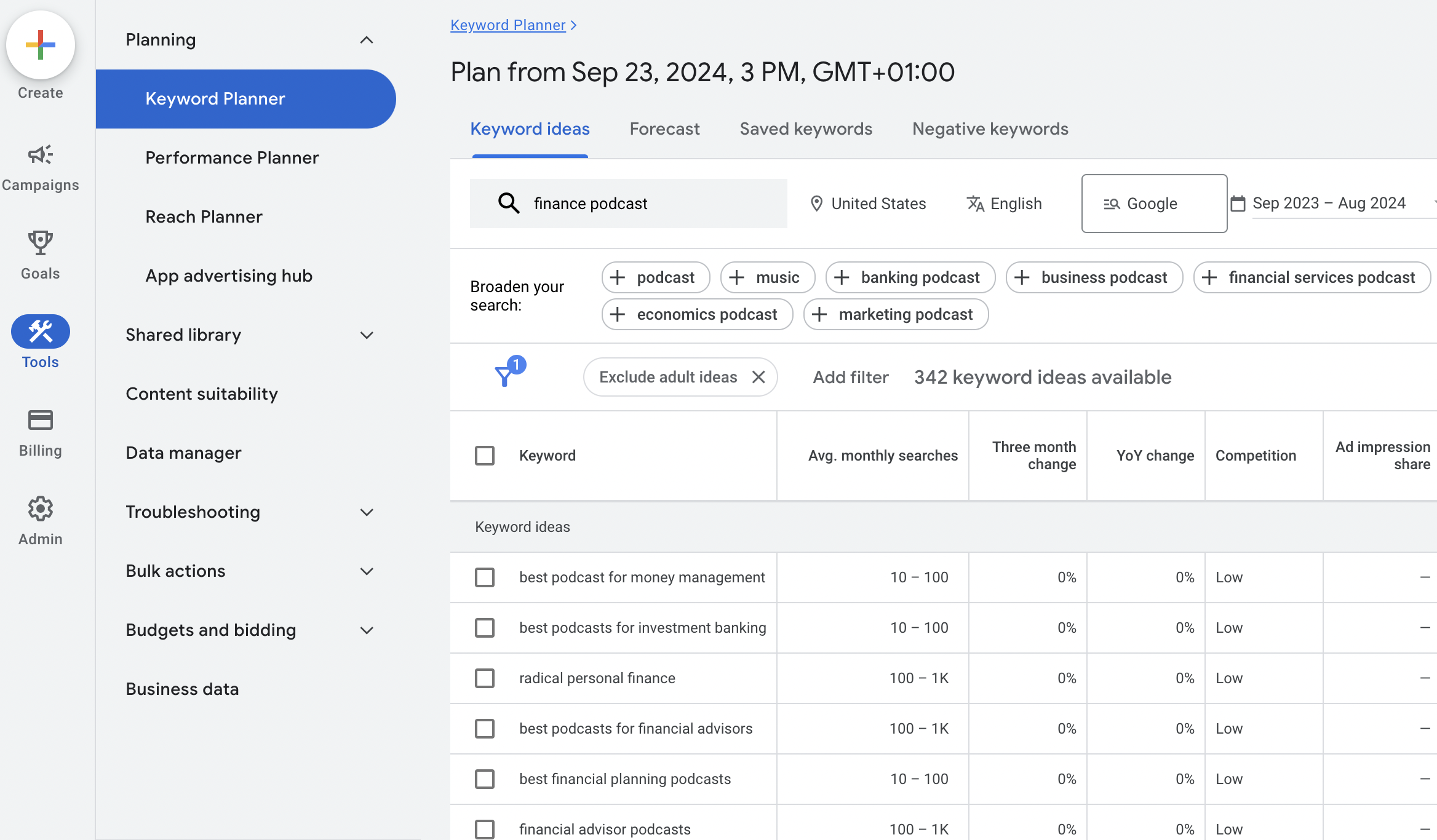
All you have to do is enter one or more words that you associate with your podcast niche, and the Keyword Planner will provide some ideas. Podcast keywords with high search volumes are appealing, but these can be difficult to rank for.
Therefore, you might prefer to opt for long-tail keywords. While these are more specific, they’re great for attracting a highly defined audience. Plus, you’ll often face less competition for these keywords.
4. Select a Suitable Domain Extension
A domain name consists of various parts. However, there are only two parts to concern yourself with (unless you want to set up subdomains).
The main part of the domain name (that contains your podcast/brand name) is called the second-level domain. This is followed by the top-level domain (TLD) or domain extension, which sits right at the end.
The most common domain extension is .com, but there are tons of other TLDs. These include regional ones like .uk or .fr and industry-specific extensions.
Here are some extensions that work well for podcast websites:
- .audio is often adopted by musicians but also works for podcasts.
- .fm was originally a country-code TLD but has since become more widespread.
- .live is a great option for YouTubers and streamers who also create podcasts.
- .show can work well since some creators refer to their content as a “show” rather than a “podcast”
On top of this, there are domain extensions that allow you to express your exact podcast niche. For instance, .today or .report work well for current events or news-based podcasts. Meanwhile, a tech-focused show might opt for .tech whereas a financial podcast could use .money.
5. Check Availability
The final factor to consider when choosing a domain name for your podcast is availability.
When you register a domain, you can browse through a list of available domain options first. If your preferred domain is taken, you’ll likely see alternative suggestions:

However, if you don’t want to compromise, you might be able to negotiate a deal with the current domain owner (as long as the WHOIS information is available). If not, you might need to change the domain extension or add a modifier to the second-level domain name.
How to Register a Custom Domain Name
The most common way to obtain a domain name is to use a reputable domain registrar like Namecheap or PorkBun. Once you’ve found a domain that you like, you can register it for a specified period (usually one or two years), after which you’ll need to renew it.
Then, you can choose a website builder to create your podcast site. Beamly.com makes it super easy to connect your custom domain to your new website:

With Beamly, you’ll get an intuitive dashboard to add/manage all your domains and subdomains. Beamly also provides a wide selection of pre-set templates to help you change the design of your podcast website.
Beamly comes with essential podcasting features like automatic episode imports and a customizable audio player. And, you’ll get access to useful integrations, a free SSL certificate, and built-in membership options to monetize your podcast.
Conclusion
If you intend to set up a dedicated website for your podcast, you’ll need a domain name to help people find your content. Better yet, a custom domain can establish credibility and help you increase trust with new listeners.
To recap, here’s how to choose a domain name for your podcast:
- Prioritize short and simple names.
- Reinforce your branding.
- Include relevant keywords.
- Select an apt domain extension.
- Check availability.
With Beamly, it’s easy to connect a custom domain to your podcast website. Plus, you get a free SSL certificate, pre-designed templates, podcast integrations, and much more. Get started for free today!


