X (Twitter) is a great way to interact with your podcast listeners and reach out to potential ones. When one of your followers likes or retweet your post, it might get displayed in front of their own followers, and sometimes this can mean tens of thousands of people. For podcasters, X (Twitter) is a really powerful tool – you can promote your episodes before they are published, post short video clips of each episode with an audiogram and subtitles, or tweet your link once the episode is officially published.
This may sound like a lot of work, but you don’t have to do it all manually – You can now automatically tweet about new episodes right when they are published on your website, all done without your investing too much of your time.
How can you do it? Well, luckily, some podcast platforms offer automation around publishing content on X (Twitter), and that’s exactly what we’re doing at Beamly. Before we dive into automation, here are a few tips for podcasters who are relying on X (Twitter)-
X (Twitter) best practices
- If you don’t have a lot of followers, start by following other people and interact with their tweets. Make sure your comments add value and are not just there to spam.
- Post frequently, at least 2 times a week. Again, make sure it’s quality tweets and not anything spammy.
- Be consistent – if your podcast is about a specific topic, try to post tweets that are related to that topic.
- Ideas for tweets – summarize an article or a podcast episode that is related to your podcast. Bring up old articles and books that people have already forgotten but still might be relevant today. Write on current events and add your perspective.
Automatic tweets for your podcast
There are multiple ways in which you can create auto-tweets for your new podcast episodes.
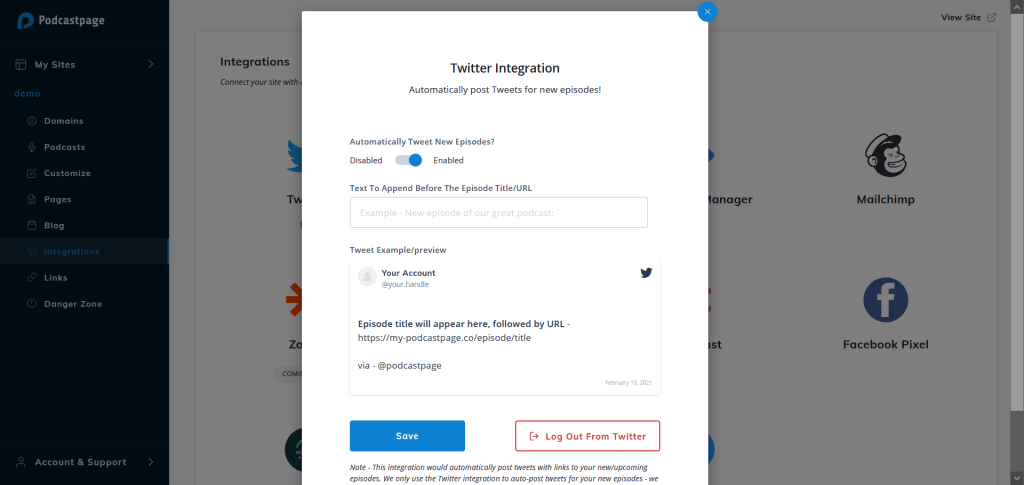
- Beamly users – If you have a podcast website with Beamly, you can automatically publish tweets when new episodes come out. Go to the integrations page on your Beamly account, click on X (Twitter), and connect your account. Now you can start customizing the preview of your future tweets – add the text you want it to display for each episode. When you save the settings, that’s the format each tweet will use, but you can update it whenever you want.
2. Automation tools like Zapier or IFTTT (If This Then That) – Both of these tools are great for automations. You can use them for many processes by defining a trigger, and an action that happens as a response. In order to auto-tweet you need to connect your RSS feed, and set it to trigger once there is a new item in the feed. Then, connect your X (Twitter) account and choose which action you would like to set once a new episode is published. It can be a simple tweet, a tweet with an image, and more.
3. Some podcast hosting services are also allowing auto-tweet. Acast, Podbean, and Libsyn, are some examples. With some podcast hosts, you can share manually each episode from the list of all your episodes, but that’s not ideal as it still involves manual work.
Do’s and Dont’s
When it comes to automatically posting on social media, you should keep a few things in mind:
- Make sure your tweets do not look too boring. Try to add a personal touch.
- Make sure the official time you publish your new episode is not in the middle of the night where most of your listeners live.
- Try to change the text from time to time and test the results.
- Even though each initial tweet is automatic, try to interact with those who like, comment or retweet your posts.
Conclusion – Automating X (Twitter) for Podcasters
When you run a podcast, or let alone multiple podcasts, automation can become an asset and help you save valuable time. You already put a lot of work planning, recording, editing and publishing your podcasts, so a touch of automation is always welcome.
Beamly is a platform that’ll help you create an entire website based on automation – you will be able to automatically import and create pages for each separate episode (by connecting your RSS feed), and on top of that, you can now post tweets automatically on X (Twitter)!